
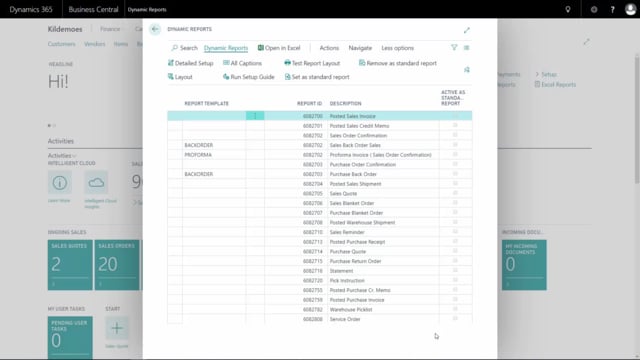


Dynamic Report is an add-on for Microsoft Dynamics 365 Business Central that supports a wide range of standard documents and report templates. When you generate your setup, you can see exactly which documents are included in Dynamic Report.
The list of supported documents grows over time. New documents and report templates are added in new releases, so the selection available to you depends on the version you are running.
Supported documents and report templates in Dynamic Report
Dynamic Report ships with a standard setup that includes a collection of documents and report templates out of the box. Once you have completed your setup in Business Central, the included documents appear directly in Dynamic Report so you can see what is available to work with.
Because the standard setup changes between releases, the documents shown in any single overview reflect only the version at that point in time. To see the most recent list of supported documents and report templates, check the Abakion website rather than relying on an older overview.
Q&A
Which documents does Dynamic Report support in Business Central?
Dynamic Report supports a range of standard documents and report templates in Business Central. After you generate your setup, the included documents are visible directly in Dynamic Report. The exact selection depends on your version, since new documents are added in new releases.
How do I find the most up-to-date list of supported documents?
Check the Abakion website for the most recent overview. New documents and report templates are added with each new release, so the website always reflects the current standard setup better than an older list.
Where can I see which documents are included after setup?
Once you have generated your setup, you can see the included documents directly in Dynamic Report inside Business Central.