
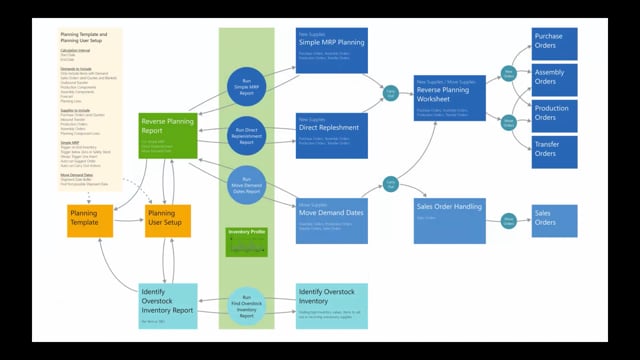


Reverse planning is an alternative approach to planning in Business Central. Instead of suggesting changes, reschedules, and cancellations across your existing orders, it focuses on creating new supply orders and finding the demands and inventory that standard planning cannot handle well.
The functionality covers four main areas: simple MRP planning, direct replenishment, move demand dates, and identify overstock inventory. A fifth area handles forecasting.
Simple MRP planning and direct replenishment only create new supply orders. They never suggest rescheduling, quantity changes, or cancellations of existing orders.
The move demand dates functionality finds demands that need to move because the supply side cannot improve. Sales orders go into a dedicated sales order handling journal so you can see which orders move and to which dates.
The identify overstock inventory functionality finds items with too high inventory values, items that expire, or items you want to sell out, even when normal planning cannot surface them.
All of it runs on planning templates and a planning user setup, so you can standardise planning across your company or build your own setups for specific purposes.
The four areas of reverse planning
Reverse planning consists of four main areas, plus a fifth for forecasting that sits outside this overview.
- Simple MRP planning creates new supplies. It is the more complex of the supply-creating methods.
- Direct replenishment also creates new supplies and only new supplies. It does the same thing as simple MRP planning, but wrapped in a simpler model so it can be used for many different purposes.
- Move demand dates moves demand dates when the supply side cannot get any better. You use it to find the demands that cannot be met and need to move.
- Identify overstock inventory finds items with too high inventory values, items that expire, or items you want to get rid of.
Both simple MRP planning and direct replenishment only create new supplies. They do not change or replenish anything that already exists.
The reports and the shared core engine
The first three areas, simple MRP planning, direct replenishment, and move demand dates, use the same core report, called the reverse planning report. The report shows different fields depending on which area you run, so the functionality differs, but underneath it uses the same engine to calculate.
The identify overstock inventory functionality has its own separate report. All of them share the same core inventory profile functionality. This is the same logic used in the graphical inventory profile and in other apps such as assigned quantity and flexible forecast. The inventory profile calculation is a deep, shared piece of core logic.
How new supply orders are created
You create new supply orders through simple MRP planning or direct replenishment. When you carry out from these, the lines transfer into the reverse planning worksheet. This worksheet works like a standard Business Central planning worksheet or requisition worksheet.
From the reverse planning worksheet you can create new orders:
- Purchase orders
- Assembly orders
- Production orders
- Transfer orders
The difference from standard planning is that you only create new supply orders. You do not get suggestions to reschedule, change quantities, or cancel existing orders.
How move demand dates handles different order types
When you carry out from the move demand dates journal, the system handles order types differently.
Assembly orders, production orders, and transfer orders move into the reverse planning worksheet, because standard Business Central already has plenty of functionality for moving dates on these. Here you get the familiar action messages for rescheduling.
Sales orders move into a dedicated sales order handling journal built into the app. In this journal you can see all sales orders that need to move, including the original date and the date they need to move to. The move demand dates functionality exists to handle demands that simply are not possible to meet.
Finding overstock and expiring inventory
The identify overstock inventory functionality finds inventory with too high a value. You can define what “too high” means, for example safety stock multiplied by a factor you set up. There are many ways to configure how the system finds items that carry too much inventory.
You can also use it to identify items that expire or items with a remaining shelf life percentage. If you have set up items you want to sell out and get rid of, you can find them here and see how many you have left to clear.
Planning templates and user setup
All of this runs on a planning user setup and planning template logic. There is a good amount of default setup included out of the box.
You can set up a planning template that applies to your whole company, so everyone uses the same templates. When you select a planning template, it updates your planning user setup. You can also build your own setup tailored to exactly what you want to do.
This means you can create different templates for different purposes throughout the year, while keeping the company-wide defaults available for everyone.
Q&A
What is the main difference between reverse planning and standard Business Central planning?
Reverse planning only creates new supply orders. It does not suggest rescheduling, quantity changes, or cancellations of existing orders the way standard planning does.
Which order types can you create from the reverse planning worksheet?
You can create purchase orders, assembly orders, production orders, and transfer orders as new orders.
What happens to sales orders when you run move demand dates?
Sales orders move into a dedicated sales order handling journal in the app, where you can see every sales order that needs to move, including the original date and the new date.
What does identify overstock inventory find?
It finds items with too high inventory values based on rules you set up, such as safety stock multiplied by a factor. It can also find items that expire, items with a low remaining shelf life percentage, and items you want to sell out.
Do simple MRP planning and direct replenishment do the same thing?
They both create new supplies and only new supplies. Direct replenishment does essentially the same as simple MRP planning, but wrapped in a simpler model so it can be used for many different purposes.
How do planning templates work in reverse planning?
You set up planning templates that apply to your whole company so everyone uses the same setup. When you select a template, it updates your planning user setup. You can also create your own templates for specific purposes.