


Reverse planning is an app for Business Central that gives you a simpler, more flexible alternative to standard MRP planning. You download it from AppSource and you are up and running in about 10 minutes with no setup required.
Reverse planning runs 10 to 20 times faster than standard MRP planning. It does not do all the calculations MRP does. Instead it suggests only the items you actually need to handle, so you get fewer lines to work through in one go.
You plan with best practice templates that come out of the box, and you can adjust each template to plan at different levels of urgency. You can trigger planning on the physical end inventory instead of the lowest inventory in the period, so you find the truly critical items first.
Reverse planning splits the work in two. Simple MRP creates only new orders. The move demands function only suggests moving demand dates. You handle one or the other, not everything at once.
What reverse planning is and how it relates to standard MRP
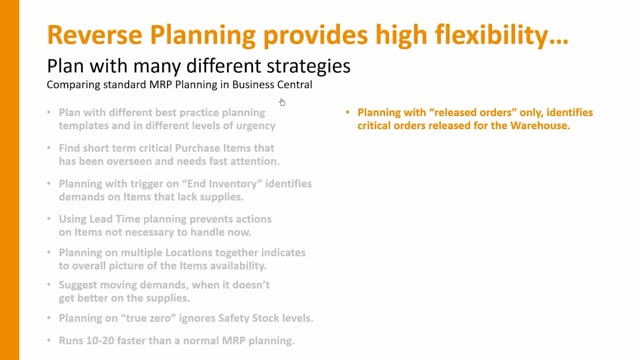
Reverse planning gives you lots of flexibility and lets you plan with many different strategies. It is not as smart as standard MRP planning in Business Central, but it is more flexible and simpler to use and get started with. It also works well alongside MRP planning, so you can use both.
The big practical difference is speed. The reverse planning calculation runs 10 to 20 times faster than normal MRP planning because it does not race through everything. It suggests only the items you need to handle.
Best practice planning templates that work out of the box
You plan with different best practice templates that come out of the box, and you can plan at different levels of urgency. When you open the reverse planning and run, for instance, the simple MRP calculation, you already have templates available.
A typical setup includes templates such as Blank and Manual, and you can add more, for example a template for direct replenishment. For each template you can define many different parameters, which gives you a lot of flexibility in how you plan and at which level of urgency.
The templates can be configured to almost anything you need. You can copy an existing template, or create your own from scratch and set it up to do exactly what you want.
Finding short-term critical purchase, production and transfer items
You can use reverse planning to find short-term critical purchase items, and even production or transfer items, that have been overseen or need fast attention. One of the first templates finds items that go below end inventory and are therefore critical.
This means you can plan with a trigger on end inventory. The plan identifies demand that lacks supply on the end inventory, not just in the period you are planning.
Take the template called “find critical items below zero on end inventory” as an example. It selects zero as the trigger on the end inventory level. It does not care if you go below safety stock during the period. It triggers only on the physical end inventory, not the lowest inventory. Items that dropped below safety stock but ended with a positive end inventory just above zero do not show up. The items that do show up are the ones you need to handle first.
Lead time planning to match the planning horizon to each item
You can use lead time planning to avoid acting too early on items that have a short lead time. Instead of planning everything within the same timeframe, you set up lead time planning per template.
Take a template for outbound transfer demands. Instead of using a fixed default start date formula, you plan within the lead time, then add a buffer. For example, multiply the lead time by 1.2 to add 20 percent, then add one week on top. An item with a long lead time is planned over a long period, while an item with a short lead time is only planned a few days ahead in the same batch job. This way you do not plan quick, replaceable items far into the future.
Planning across multiple locations
You can plan on multiple locations together. Instead of planning per location, there is a check mark called “plan per location” that lets you plan across several locations in one big bucket. If you sell from several shops, you can see whether an item is critical across locations or not.
Moving demand dates instead of creating new orders
Reverse planning suggests moving demands when the supply situation does not improve. This is one of the main areas of reverse planning, and it lives in the move demands function in the main menu.
Standard MRP planning creates a mix of suggestions in one go: new orders, moving orders, changing orders and cancelling orders. Reverse planning splits this. Simple MRP creates only new orders. The move demands function only suggests moving demand dates. Because you handle one or the other, you do not get a long list of mixed lines to work through at once.
Planning on true zero, safety stock or reorder point
You can plan on true zero, which ignores safety stock levels. This lets you plan only on items that are actually at zero and truly critical. You can also choose to plan on safety stock or on the reorder point. The choice between zero, safety stock and reorder point gives you another way to plan at different levels of urgency.
Selecting which supplies and demands to include
You can select which supplies and demands to use when identifying your critical items. On a template card there is a full selection of which order types to include: all sales orders or only released sales orders, which types of production orders, which production order components, and whether to include all purchase orders. With this setup you decide exactly which supplies and demands feed the calculation.
Finding overstock inventory to cancel supplies or sell out items
You can find overstock inventory to identify high inventory bindings or supplies you need to cancel. Where standard MRP would generate cancellation actions, reverse planning handles this with a dedicated overstock inventory function. It shows items that are too high on inventory, supplies you need to cancel, and items you may need to sell out because they did not sell as much as expected.
Reducing planning time with item filtering
There is a check mark that lets you plan only on items that exist on demand orders. If you have many item numbers, this reduces planning time a lot. The plan starts by checking whether an item appears on one of the demand lines, such as transfer orders, sales orders, production order components or assembly orders. If the item is not there, it skips the item, which saves a lot of time.
Breaking down a long-term sales forecast
You can use reverse planning to break down a long-term sales forecast. If you have a sales forecast for next year and want to understand the consequences on the purchase side, the production side or capacity requirements, you can run the calculation to get the answer. This lets you give an estimate or budget, or even a purchase forecast, to your vendors.
Getting started
Reverse planning requires no setup to get started. You download it from AppSource and you are up and running in about 10 minutes. All templates come out of the box with best practice setup, and you can change them as you want, but they work straight away.
Q&A
What is the difference between reverse planning and standard MRP planning in Business Central?
Standard MRP generates a mix of suggestions in one go, including new orders, changes, moves and cancellations. Reverse planning is simpler and more flexible. It splits the work, suggests only the items you need to handle, and runs 10 to 20 times faster. It is not as smart as MRP, but it is easier to start with and works well alongside MRP.
How fast can you start using reverse planning?
You download it from AppSource and you are up and running in about 10 minutes. It requires no setup, and all templates come out of the box with best practice configuration.
How does reverse planning help you find critical items?
It can trigger on the physical end inventory rather than the lowest inventory in the period. A template such as “find critical items below zero on end inventory” surfaces only the items that end below zero, so you handle the truly critical items first.
What is lead time planning in reverse planning?
Lead time planning matches the planning horizon to each item’s lead time. You plan within the lead time and add a buffer, for example multiplying by 1.2 to add 20 percent and adding one week. Long lead time items are planned over a long period and short lead time items only a few days ahead, so you do not plan replaceable items too far into the future.
Can you plan across multiple locations at once?
Yes. A check mark called “plan per location” lets you plan across several locations in one bucket instead of planning each location separately. This helps you see whether an item is critical across locations, for example when selling from multiple shops.
How do you identify overstock and supplies to cancel?
You use the overstock inventory function. It identifies items with too high inventory bindings, supplies you need to cancel, and items you may need to sell out because they did not sell as expected.
Can you use reverse planning for long-term sales forecasts?
Yes. You can break down a long-term sales forecast to see the consequences on purchasing, production and capacity. This lets you produce an estimate, a budget or a purchase forecast for your vendors.