
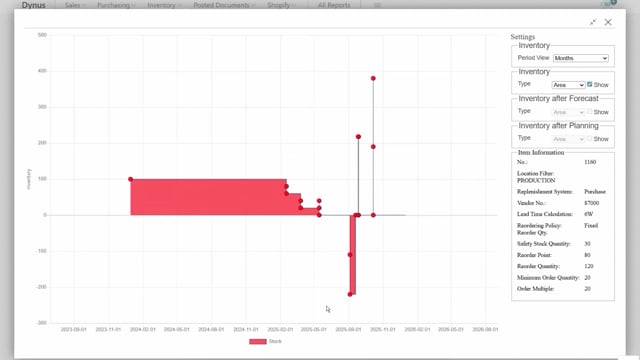


Reverse planning in Microsoft Dynamics 365 Business Central lets you move demand dates when a supply date slips and you cannot pull the supply back in. Standard MRP planning assumes you can reschedule the supply. Reverse planning handles the opposite situation, where the supply is fixed and the demand has to move instead.
When a vendor delays a purchase order and you cannot move it, reverse planning calculates the consequences up through the bill of material. It uses low-level codes to start with purchase items, then production items, transfer items, assembly orders, and finally the sales order.
The function pushes all affected supply orders into a reverse planning worksheet with reschedule and postpone actions. If no sales orders appear in the worksheet, no sales order is affected by the delay.
Why standard planning does not solve a delayed supply
Imagine you have already run a full MRP planning. Everything balances, and the planning worksheet is blank. Then your vendor calls about a delay.
In this example, the item is a tire, item 1160, supplied by a vendor in Shanghai. The purchase order was scheduled for delivery on August 5, but the vendor now says they can only ship on August 20.
The standard planning worksheet does not help here. It is built on the assumption that you can move the supply to meet the demand. If you recalculate, it would suggest rescheduling or recreating the supply so the item arrives on August 5. But that is exactly what you cannot do. You have already called the vendor several times, and August 20 is the earliest they can deliver.
Moving demand dates instead of supply dates
When the supply date is fixed, you need the opposite functionality: move the demand dates to match the late supply. This is what the “suggest moving demand dates” function does.
It calculates from the bottom up using low-level codes. It starts with all the purchase items, moves up through the lowest level of production items, then transfer items and assembly orders, and continues all the way up to the sales order.
In this example, the late tire delivery forces the due date on two production orders to move from August 14 to October 1. There is lead time on these production orders, so the delay ripples forward.
How the delay accumulates through the hierarchy
If you look at the supply changes on the first production order, a firm planned production order, you can see it has to move because of the delayed item. The same applies to the front wheel.
Those two changes accumulate up through the hierarchy. The city bike production orders that depend on the wheels also have to move. Each of these is a production order, so they all end up in the reverse planning worksheet when you carry out the action.
You check everything in the worksheet, confirm the changes, and carry out the actions. Every affected order is moved into the reverse planning worksheet with reschedule actions to postpone the production orders.
Confirming that no sales orders are affected
In this example, no sales orders showed up in the list. That tells you directly that no sales order is harmed by the delay.
If a sales order had been affected, the “suggest moving demand dates” function would have found it and shown the sales order lines that needed to move. Because none appear, you know the delay stays contained within the production orders and does not reach a customer commitment.
This is the whole point of reverse planning: moving demand dates when the supply date cannot get any better.
Q&A
What is reverse planning in Business Central?
Reverse planning lets you move demand dates when a supply date slips and you cannot pull the supply back in. Standard MRP assumes you can reschedule the supply to meet demand. Reverse planning handles the opposite case, where the supply is fixed and the demand has to move.
When should you use reverse planning instead of standard planning?
Use reverse planning when a supply order, such as a delayed purchase order from a vendor, cannot be moved earlier. The standard planning worksheet would suggest rescheduling the supply, which is not possible in this situation. Reverse planning moves the dependent demand dates instead.
How does reverse planning calculate the impact of a delay?
It calculates from the bottom up using low-level codes. It starts with purchase items, then moves through production items, transfer items, and assembly orders, up to the sales order. The delay accumulates through the bill of material hierarchy, and all affected orders land in the reverse planning worksheet.
How do you know if a customer’s sales order is affected by a supply delay?
If a sales order is affected, the suggest moving demand dates function finds it and shows the sales order lines that need to move. If no sales orders appear in the worksheet, no sales order is harmed by the delay.