
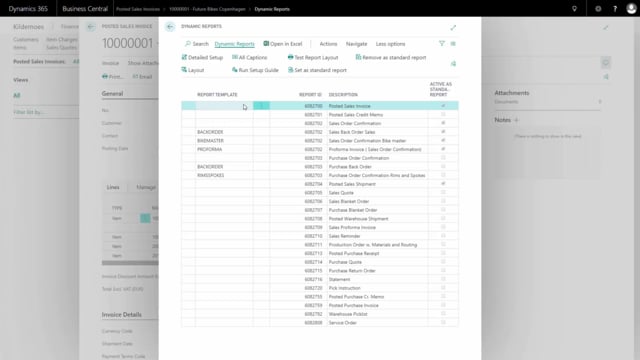


Adding extra information to your Business Central document layouts does not always require a developer. With Dynamic Reports, you can extend a column with fields from related tables yourself. This article walks through a concrete example: adding the sales tariff number to the description column on a document.
The sales tariff number is stored on the item card, not on the document line. To show it on the document, you link from the document line to the item card using the item number as the key, then add the field to the column setup.
You can add both the field value and a caption that acts as a heading for the information. Once configured, the tariff number prints directly underneath the item description on the document.
Adding the sales tariff number to a document with Dynamic Reports
In this example, we want to add the sales tariff number to the description column on a document. The configuration happens in Dynamic Reports.
Start by searching for Dynamic Reports. Mark the relevant document and press Detail Setup. From there, go into the column setup under Dynamic Reports, Columns.
Defining the column and linking to the item card
Find the column where the description column is defined and press Fields. Here you add an extra line for the new information.
The sales tariff number for the item is stored on the item card, so you need to link over to the item card to fetch the value. The key that links the document line and the item card together is the item number.
Define the table the information should come from. In this case, that is the item card, table 27. Using Fields, you can look up and search for the specific information you want to show.
Adding a caption as a heading
You can also add a heading for the information. Add the caption so it stands in front of the value, and it is highlighted in the headings.
When you print out the document, the tariff number now appears just underneath the item description.
Q&A
Where is the sales tariff number stored in Business Central?
The sales tariff number is stored on the item card (table 27), not on the document line. To show it on a document, you link from the document line to the item card.
Which key links the document line to the item card?
The item number is the key that links the document line and the item card together.
How do you add an extra field to a document column in Dynamic Reports?
Search for Dynamic Reports, mark the document and press Detail Setup. Open the column setup under Dynamic Reports, Columns, find the relevant column, press Fields, and add an extra line for the field you want. Define the source table and look up the field.
Can you add a heading to the new field?
Yes. You add a caption that stands in front of the information, and it is highlighted in the headings when the document prints.