
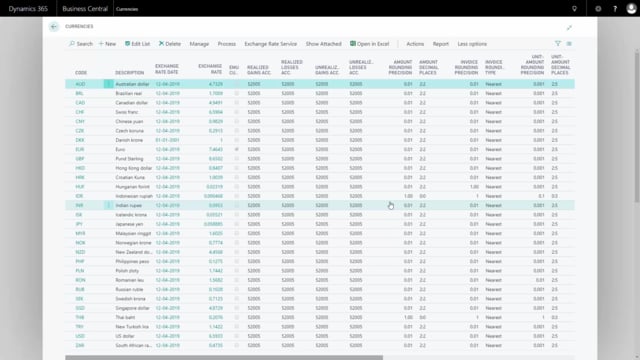


Adjusting exchange rates in Microsoft Dynamics 365 Business Central updates the local currency value of your customer, vendor, and bank entries and posts the difference to your gain and losses account in the general ledger. You run the adjustment from the Currencies list using the Adjust Exchange Rates batch job after you have updated your exchange rates.
You select an ending date for the period you want to adjust, and the batch job adjusts all entries in foreign currencies according to the updated exchange rate. The batch job stops if a currency has no exchange rate, so it only processes currencies that actually have a rate defined.
The adjustment only posts to the gain and losses account in the general ledger. The gain and losses account sits on your income statement, so large currency holdings in foreign currencies can have a significant impact on your result.
When to run the exchange rate adjustment
After you have updated your exchange rates, you typically want to update the value of your foreign currency entries and post any differences to your gain and losses account in the general ledger. You do this with a batch job that adjusts everything according to your exchange rate update.
Running the Adjust Exchange Rates batch job
You find the functionality in the Currencies list under the process menu, where it is called Adjust Exchange Rates.
In most cases you only need to select an ending date for the period you want to adjust to. The system suggests a posting description by default, which you can leave as it is. You also enter a document number for the posting.
You can run the batch job per currency or for all currencies at once.
What the batch job adjusts
The standard setup adjusts customer, vendor, and bank accounts. This means the entries on customers, vendors, and banks have their local currency amount adjusted according to the exchange rate defined by the update.
If you use a reporting currency, you can choose to adjust the reporting currency in your general ledger as well.
When the batch job runs, it updates the gain and losses account in the general ledger and adjusts your vendors, customers, and bank accounts. Currencies are only adjusted where there is actually something to adjust.
Currencies without an exchange rate
If you have currencies without an exchange rate, the batch job will stop. It only runs for currencies that have an exchange rate defined, so make sure your rates are in place before you run the adjustment.
Checking the result in the general ledger
After running the batch job, you can go into your general ledger to see exactly what it did. There you can find the adjustment posted on the ending date you selected, for example March 31, going into your gain and losses account.
Impact on your income statement
Your gain and losses account sits on the income statement, so it changes whenever there are differences in your exchange rate. Normally these differences follow the timing of your selling and buying.
The adjustment can have a larger impact if you hold a substantial amount of money in currencies other than your local currency, for instance on your bank accounts. In that case the income statement effect can be considerable. The adjustment is only made on the gain and losses account.
Q&A
Where do I find the exchange rate adjustment in Business Central?
You find it in the Currencies list under the process menu, where the functionality is called Adjust Exchange Rates.
What does the Adjust Exchange Rates batch job actually update?
It adjusts the local currency amount on customer, vendor, and bank entries according to the updated exchange rate, and it posts the difference to the gain and losses account in the general ledger. If you use a reporting currency, you can also choose to adjust it.
What happens if a currency has no exchange rate?
The batch job stops. It only processes currencies that actually have an exchange rate defined, so you need to make sure your rates are in place before running it.
Can I run the adjustment for a single currency?
Yes. You can run the batch job per currency or for all currencies at once.
How does the adjustment affect my income statement?
The gain and losses account is on the income statement, so it changes with exchange rate differences. If you hold large amounts in foreign currencies, for example on your bank accounts, the impact on your income statement can be significant.