



How does subcontractor purchase orders only creates capacity ledger entries on production orders in Business Central?
How subcontracting orders post costs in Business Central
When you use subcontracting orders in Business Central, the cost flow works differently than with a standard purchase order. A subcontracting order is a purchase order created from a subcontracting worksheet, and it does not move anything into inventory. Instead, it creates capacity ledger entries and attaches them directly to the production order. This makes sense because subcontracting is a process step, not a physical item you stock.
Here is how the whole flow works, step by step, using a concrete example.
Receiving a subcontracting order without posting cost
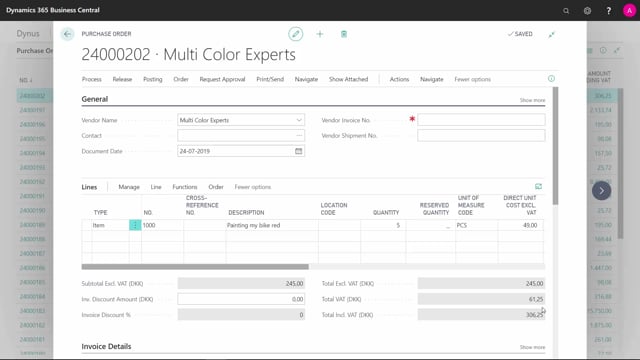
The starting point is a purchase order that has been received but not yet invoiced. On the purchase order line you can see a quantity received of five and a quantity to invoice of five. The line also carries a production order number and a production order line number, which is what ties the subcontracting work back to the right production order.
In this setup, expected cost is not being used. That means no cost has been posted to the production order at this point. The capacity ledger entry, however, is already created at receipt because the link to the production order is in place.
If you look at the released production order at this stage and navigate the entries, you will find:
- No item ledger entries, because no consumption or output has been posted and nothing has moved through inventory.
- One capacity ledger entry, originating from the specific subcontracting purchase order.
- No value entries yet, because expected cost is not running, so cost is only posted at invoicing.
Posting the invoice and creating the value entry
When you invoice the purchase order, you enter your invoice number on the order. The actual invoice cost may differ from what was on the order, so you can enter the changed cost before posting the invoice.
After posting the invoicing, go back to the released production order and look at the entries again. The capacity ledger entry is still there, and now a value entry has been created with the cost amount from the invoice attached to it.
Why subcontracting cost shows up as work in progress
This behaviour is the key point. The subcontracting cost does not go to inventory, because it is not an item. It is a process. The cost is captured as work in progress on the production order.
From there it follows the output item and contributes to the value of that output item. In this example, that is item number 1000. So the subcontracting cost ends up in the finished item’s value, exactly where it belongs, without ever creating a separate inventory transaction for the process itself.
Q&A
What is a subcontracting order in Business Central?
It is a purchase order created from a subcontracting worksheet. It represents a process step performed by a subcontractor rather than a physical item, so it does not create inventory adjustments.
Does a subcontracting order create inventory entries?
No. A subcontracting order does not move anything into inventory and creates no item ledger entries. Instead, it creates capacity ledger entries that are attached automatically to the production order.
When is the cost of a subcontracting order posted to the production order?
If you are not running expected cost, the cost is posted when you invoice the purchase order. At receipt only the capacity ledger entry is created, and the value entry with the cost amount appears after you post the invoice.
Where does the subcontracting cost end up?
The cost is captured as work in progress on the production order. It then follows the output item and contributes to that item’s value, for example item number 1000.
Can I change the subcontracting cost at invoicing?
Yes. If the actual invoice amount differs from the cost on the purchase order, you can enter the changed cost before posting the invoice, and the corrected amount is reflected in the value entry.
I have a purchase order here, it’s already received, but it’s not invoiced, I can see the quantity received is 5, and quantity to invoice is 5.
Since I’m not using Expected Cost, no cost has been posted to the order.
But the Capacity Ledger Entry is already made.
Because on this Purchase Order Line, I have a Production Order Number and Production Order Line Number etc.
I find the released Production Order here, and I know it’s the last Production Order.
If I navigate this order, I can see there are no Item Ledger Entries.
I haven’t posted any consumption, output or anything else on this purchase order, which is subcontractor.
In the Capacity Ledger Entries, I can see, I do have one entry, and I know it’s coming from that specific Purchase Order number.
In the Value Entries, because I’m not using Expected Cost, I can see, that I have no Value Entries for now.
I invoice the Purchase Order, and I insert the invoice number, and maybe on the actual invoice, the cost was something else, so I enter the changed cost, and I post the invoicing of the Purchase Order.
When I look at the released Production Order, and I find the Capacity Ledger Entries, I navigate into the Value Entires.
I can see, it created a Value Entry, and the cost amount on that specific entry.
This means, the item did not go to inventory, because it’s not an item.
It’s a process, taken up as WIP on the Production Order.
It will follow my output item, and follow the value on the output item 1000.