
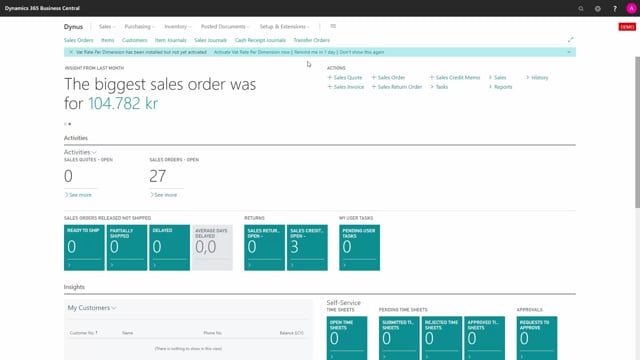


When you install VAT Rate per Dimension in Business Central, you get a notification in your Role Center that the app is ready. You can dismiss the notification or postpone it, and you can always activate the app later by searching for “VAT Rate per Dimension”. During activation you enter your email for trial communication, and the built-in installation guide links you to How-To material so you can start configuring and using the app right away.
Notification in the Role Center after installation
Once VAT Rate per Dimension has been installed, you are notified directly in your Role Center. From the notification you can choose to be reminded again in a day, or you can select the option not to show the notification again.
If you choose to dismiss the notification, you have not lost access to the app. You can activate it at any time by searching for “VAT Rate per Dimension” in Business Central.
Activating the app and entering your trial email
To activate the app, open it and follow the activation steps. You enter your email address, which is used for communication about the trial, and then press Next to continue.
From the installation guide you can go straight into the How-To section to learn more about the product. When you press Finish, the app is activated and ready to use.
Getting started after activation
After activation you can start configuring and using VAT Rate per Dimension. The installation guide gives you a direct path to the documentation, so you can set up the functionality without leaving the app.
Q&A
How do I know when VAT Rate per Dimension has been installed?
You receive a notification in your Role Center when the app has been installed. From there you can be reminded the next day or dismiss the notification.
What happens if I dismiss the activation notification?
Nothing is lost. You can activate the app later by searching for “VAT Rate per Dimension” in Business Central.
Why do I need to enter my email during activation?
Your email is used for communication about the trial. You enter it during activation and then press Next to continue.
How do I finish activating the app?
Follow the steps in the installation guide and press Finish. The app is then activated, and you can start configuring and using it.