
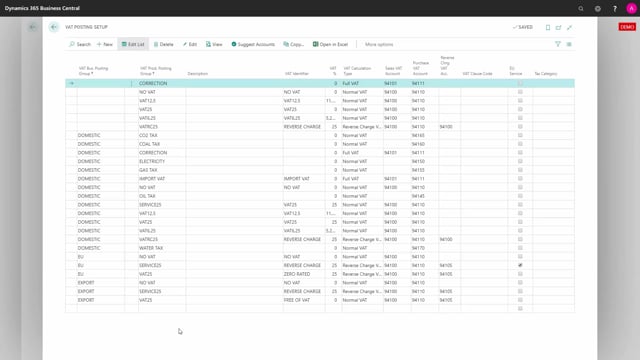


If you are about to start using VAT rate per dimension in Business Central, there is one setup detail you need to verify first. The VAT calculation type for the relevant VAT posting groups must be set to Normal VAT. If it is set to anything else, your VAT rate per dimension setup will not work as expected.
You find this setting in the VAT Posting Setup. Filter on the VAT posting groups you have used in your VAT rate by dimensions setup, then check that the VAT calculation type is Normal VAT for each of them.
What to check before using VAT rate per dimension
Before you start posting with VAT rate per dimension, go to the VAT Posting Setup in Business Central. This is where you control how VAT is calculated for each combination of VAT business posting group and VAT product posting group.
The point is to confirm that the VAT posting groups you have chosen in your applicable dimensions are configured correctly. The dimensions reference these posting groups, so the setup behind them has to match what you expect.
How to find the VAT posting setup in Business Central
You can search directly for VAT Posting Setup using the search function. Once you are in, the list can be long, so it helps to filter on the specific VAT posting group you are working with. That narrows the view down to the relevant lines instead of scrolling through the whole table.
In this example there are two setup lines for the VAT posting group used in VAT rate by dimensions. Filtering makes it much easier to get an overview and to verify each line individually.
Setting the VAT calculation type to Normal VAT
The key thing to confirm in the VAT posting setup is the VAT Calculation Type. For VAT rate per dimension to work, this field needs to be set to Normal VAT.
Check this for every VAT posting group that you have set up in VAT rate by dimensions. As long as the calculation type is Normal VAT, you are ready to move on and start using the feature.
Q&A
What do I need to check before using VAT rate per dimension?
You need to check the VAT Posting Setup for the VAT posting groups you use in your applicable dimensions. Specifically, the VAT Calculation Type must be set to Normal VAT.
Where do I find the VAT Calculation Type setting?
Search for VAT Posting Setup in Business Central. Filter on your VAT posting group to narrow the list, then check the VAT Calculation Type field on the relevant lines.
What value should the VAT Calculation Type have?
It should be set to Normal VAT for each VAT posting group you have configured in VAT rate by dimensions.
How do I make the VAT Posting Setup easier to read?
Filter on the specific VAT posting group you are working with. This shows only the relevant setup lines instead of the entire table.