
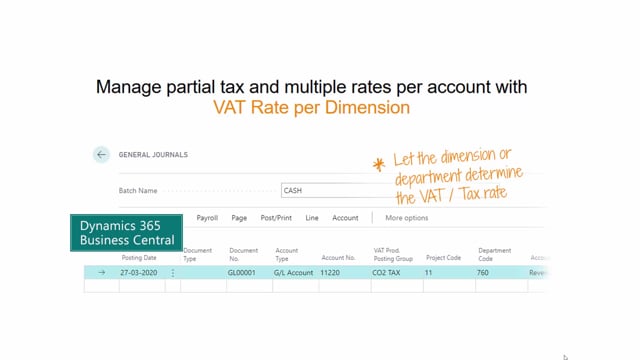


Business Central only supports a single VAT or tax posting group for each general ledger account out of the box. If you need different VAT rates for the same account, the VAT Rate per Dimension app lets you configure VAT or tax posting groups per dimension, so the correct VAT is set automatically when you select a dimension during posting.
You configure a VAT or tax code for a specific department or dimension. When you post entries from a general journal, purchase line, or sales line, selecting a dimension triggers the app to set the correct VAT posting group based on your configuration.
This removes the need to duplicate general ledger accounts as a workaround when departments have partial VAT or no VAT.
The limitation in standard Business Central
Out of the box, Business Central only supports a single VAT or tax calculation for each general ledger account. That works fine until your organisation has departments where the VAT treatment differs.
This becomes a real problem if some departments use partial VAT, and others use no VAT at all. The standard system gives you one VAT product posting group per account, and that is it.
To get around this, some companies duplicate accounts so they can select different VAT or tax posting groups. It works, but it is a poor workaround that clutters your chart of accounts and makes posting more error-prone.
What the VAT Rate per Dimension app does
The VAT Rate per Dimension app lets you select your own VAT or tax posting group when posting entries to an account, controlled by dimension. You configure a VAT or tax code to be used for a specific department or a specific dimension.
This means you can work with individual VAT rates per dimension on the same amount and the same account, without creating duplicate accounts.
How it works in practice
When you type in an account number, it has a VAT product posting group as standard. With the app installed, entering a dimension code can automatically update the VAT product posting group based on your configuration.
The same logic applies whether you post from a general journal, a purchase line, or a sales line. You select a dimension, and the app sets the correct VAT posting group for you.
Q&A
Why does Business Central only allow one VAT posting group per account?
That is how the standard system works. Each general ledger account is tied to a single VAT or tax calculation out of the box, which becomes a limitation when departments need different VAT treatment.
How can I handle partial VAT or no VAT for specific departments?
Use the VAT Rate per Dimension app. It lets you configure a VAT or tax posting group per dimension, so the correct VAT is applied automatically based on the department or dimension you select.
Do I still need to duplicate accounts to support different VAT rates?
No. The app removes the need for duplicate accounts by letting you set different VAT rates per dimension on the same account.
Where does the automatic VAT selection apply?
It works when you post entries from a general journal, a purchase line, or a sales line. Selecting a dimension triggers the app to set the correct VAT posting group based on your configuration.