
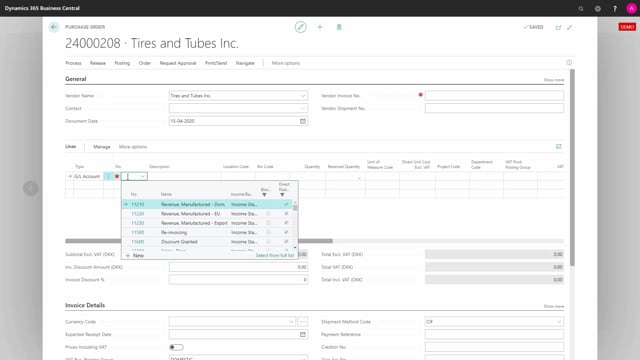


If you use Business Central and need VAT to follow your dimensions, the VAT rate per dimension setup lets you control which VAT product posting group applies based on a dimension value such as department code. The functionality works on purchase lines when you enable it in the setup.
When you choose a GL account on a purchase order, Business Central applies a default VAT product posting group and VAT percentage. If you then select a department code that has been set up in the VAT rate per dimension setup, the VAT product posting group and the VAT percentage update automatically according to that setup.
VAT rate per dimension setup works on purchase lines
When you enable the option in the VAT rate per dimension setup, the functionality also applies to purchase lines. This means you can control the VAT product posting group on a purchase order based on the dimension values you assign to the line.
How to use it on a purchase order
On a purchase order, set the line type to GL account. In the account number field, choose one of the accounts you have configured in the setup.
To make the behaviour easier to follow, you can personalize the purchase order page to show the relevant columns. In this example, the page shows two global dimensions, project and department code, along with the VAT product posting group and the VAT percentage.
Default VAT posting group and automatic update from dimensions
By default, the setup applies the VAT product posting group VAT 25, and the VAT percentage is set to 25.
When you choose a department code that has been set up in the VAT rate per dimension setup, the VAT product posting group changes. Once you leave the line, both the VAT product posting group and the VAT percentage update automatically according to the setup.
Q&A
Does VAT rate per dimension work on purchase lines?
Yes. If you enable the option in the VAT rate per dimension setup, the functionality works on purchase lines, not just sales lines.
What line type do I need on a purchase order to use this?
Set the line type to GL account and choose one of the accounts you have configured in the VAT rate per dimension setup.
What happens to the VAT posting group when I change a dimension?
When you select a department code that is set up in the VAT rate per dimension setup, the VAT product posting group changes. When you leave the line, the VAT product posting group and the VAT percentage update automatically according to the setup.
What is the default VAT setting before applying a dimension?
By default the setup applies the VAT product posting group VAT 25, with a VAT percentage of 25.