


When you go live with a new Business Central solution, you often want your bank balances to be in place from day one. At the same time, you want to keep your chart of accounts clean so you can post the full opening balance later. This article shows you how to open your bank accounts with entries while keeping the general ledger reset to zero.
You do this by posting a general journal where the bank account is both the account and the balancing account. The amount lands on the bank account as an entry, but because the same bank account points to its posting group on the general ledger, the two entries cancel each other out and the ledger account stays at zero.
This means you can show open bank entries that match your real bank balances, without affecting the chart of accounts. The general ledger remains ready for a complete opening posting at a later stage.
Checking that the chart of accounts is reset before you start
Before posting anything, open your chart of accounts and remove the filters so you see all entries. If nothing has been posted yet, every account shows zero. This confirms you are starting from a clean ledger, which is exactly what you want when the goal is a full opening balance later on.
Posting bank opening entries in the general journal
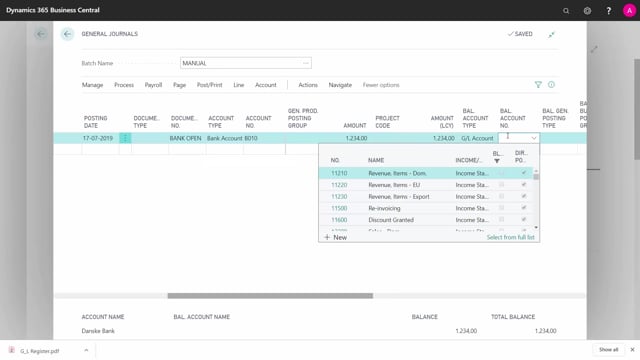
To open your banks, go into a general journal. The setup is straightforward:
- Enter a document number, for example “Bank opening”.
- Set the account type to Bank Account and select the relevant bank account.
- The currency code fills in automatically.
- Enter the bank amount.
- As the balancing account, select the same bank account that the line is pointing to.
You repeat this for each bank you have. Even with just two lines, it is worth preparing the journal in advance so you have your banks, your amounts, and your balancing accounts ready before you post.
Why you use the same bank account as the balancing account
The point of using the same bank account on both sides is to keep the general ledger untouched. To do this correctly, you need to check your bank account posting groups. There you can see which posting group is assigned to each bank account, for example the local currency posting group on a specific bank account.
Because the bank account and the balancing account point to the same posting group on the chart of accounts, the posting creates two offsetting entries on the same general ledger account. The net effect on the ledger is zero, while the bank account itself receives proper open entries reflecting your real balance.
The result after posting
After you post the journal, go back into the chart of accounts. The relevant account still shows zero, because the two entries balance each other out. At the same time, your bank accounts now hold entries that match your actual bank balances.
From here, your general ledger is clean and ready. You can proceed to open the general ledger with a full opening balance whenever you are ready, without the bank opening having disturbed your accounts.
Q&A
How can I open bank balances in Business Central without affecting the chart of accounts?
Post a general journal where the bank account is both the account and the balancing account. The amount creates open entries on the bank account, but the two offsetting entries land on the same general ledger posting group, so the chart of accounts stays at zero.
Why should I use the same bank account as the balancing account?
Using the same bank account on both sides means both entries hit the same posting group on the general ledger. They cancel each other out, which keeps the ledger reset while still giving the bank account its opening entries.
How do I know which posting group a bank account uses?
Open your bank account posting groups. There you can see which posting group, for example the local currency posting group, is assigned to each bank account on the chart of accounts.
How do I confirm the general ledger is still clean after opening the banks?
Go back into the chart of accounts and remove the filters. The relevant account still shows zero, because the bank opening created two offsetting entries. This means the ledger is ready for a full opening balance later.