
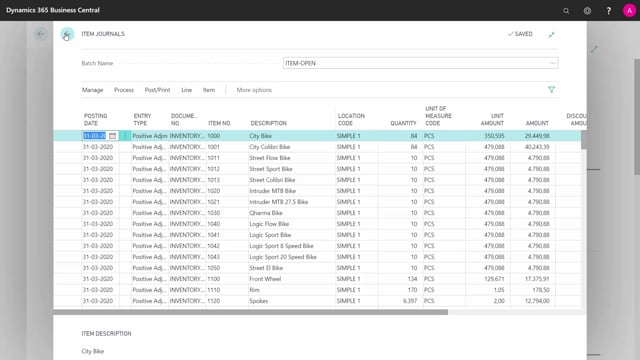


This is what happens in the video
When you go live with a new Business Central solution, you need to enter opening balances for both your finance accounts and your inventory. The challenge is that posting inventory openings automatically creates entries in your general ledger, which means you risk getting double postings if you are not careful. The strategy that solves this is to reset the GL entries created by subledger postings, and then post one final general ledger opening at the end.
You enter inventory openings through an inventory journal with item numbers and quantities. You enter subledger openings, such as customers, vendors, VAT, bank, and fixed assets, by using the same account as both the posting account and the balancing account, so the entries cancel each other out in the GL. Once all subledger and inventory openings are done, you post your final general ledger opening, which becomes the actual opening balance you want when you go live.
Why opening balances need a clear posting strategy
Before you go live, your chart of accounts is empty and your inventory is zero. If you remove the filters on your entries, you will see that there is nothing in your general ledger. From this clean starting point, you have two jobs to do: open your finance accounts and open your inventory.
The problem is that several of these openings post to the general ledger automatically. If you do not handle that, you end up with figures in your GL that you did not intend to put there, and your final opening balance will be wrong. That is why the order and method matter.
How to post inventory openings in Business Central
Inventory is the simplest one to start with because it only involves items. You create an inventory journal for opening your inventory, enter your item numbers and quantities, and post it. That creates your inventory openings.
This posting also creates entries in your general ledger, and those entries need to be reset. To do this, you use a general journal opening for inventory that mirrors the quantities and reverses the inventory postings made in the GL. With the matching values entered, you cancel out the GL effect of the inventory you just created, while keeping the actual item quantities in stock.
How to post subledger openings without touching the chart of accounts
The same principle applies to all the other openings that are not the final GL opening, such as your bank, your VAT, your customers, your vendors, and your fixed assets.
The easiest strategy is to use the subledger account as one side of the posting, and then select the same account as the balancing account. For example, when you open a customer balance, you set the balancing account to the same account that the customer entry posts into. This way the two sides cancel each other out.
The benefit is that you can do all your openings without creating any unwanted balances in your chart of accounts. You are still generating a lot of GL entries, but because you also create the opposite entry in the same way, the net effect on the general ledger is zero.
Posting the final general ledger opening
When you have finished all your separate openings on VAT, vendors, customers, fixed assets, and so on, you can post your final general ledger opening. This is the opening balance you actually want to have in place when you go live.
The strategy, in short, is to create all the separate entries in the different subledger tables first, neutralise the GL effect of those postings as you go, and then post the general ledger opening at the very end.
Q&A
Why do inventory openings create entries in the general ledger?
When you post an inventory journal with item numbers and quantities, Business Central automatically generates corresponding entries in the general ledger to reflect the value of the inventory. These GL entries need to be reset so they do not interfere with your final opening balance.
How do you reset the GL entries created by an inventory opening?
You use a general journal opening for inventory that mirrors the same quantities and reverses the inventory postings made in the general ledger. This cancels the GL effect while keeping the actual item quantities in stock.
How do you post customer and vendor opening balances without affecting the chart of accounts?
Use the subledger account as one side of the posting and select the same account as the balancing account. The two sides cancel each other out, so the net effect on the general ledger is zero even though entries are created.
In what order should you post opening balances when going live?
Post all the separate subledger and inventory openings first, neutralising their GL effect as you go. Then post the final general ledger opening at the end, which becomes the actual opening balance you want when you go live.