
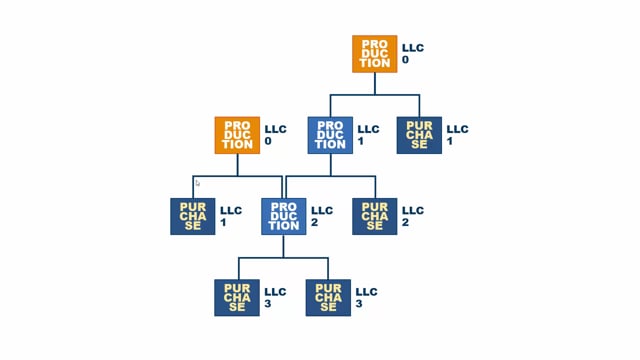


Low Level Code (LLC) is a number that Business Central and most other ERP systems calculate automatically. The system uses it to control the sequence of MRP planning so that every item gets planned in the right order.
An item’s Low Level Code is the lowest level at which it appears anywhere in your bill of materials structure. If an item is used as a component in several products that sit at different levels, the LLC reflects the lowest of those levels. This makes sure the item is planned only after every product it feeds into has already been planned.
Items that are not used in any BOM get LLC 0. This includes both top-level finished goods and purchase items that you simply buy and sell. You can check whether an item goes into anything else from the Menu tab on the item in Business Central.
What Low Level Code is and why Business Central calculates it
Low Level Code is calculated automatically and is used for planning. It places each item at a level in your production hierarchy. Purchase items you buy feed into manufactured items, semi-finished items, and finished goods. Some finished goods sit at higher levels than others.
Take a bike as an example. The bike used to be a top-level item with LLC 0. If you then create a new item, a package that contains three bikes, the package becomes the level 0 item and the bike becomes a level 1 item. The package is now what gets planned first.
How the levels are assigned in a BOM structure
The first thing to figure out is which items do not go into any other item, meaning they are not a component in any BOM. Those are your LLC 0 items.
All items that go directly into an LLC 0 item are LLC 1 items. But an item can be used in more than one place. If an item goes into both an LLC 0 item and an LLC 1 item, it gets LLC 2, because the rule is to find the lowest level at which the item appears.
The planning for that item in the middle has to happen at LLC 2. That way you make sure both items it feeds into have already been planned before the shared component is planned.
How MRP planning runs through the Low Level Codes
MRP planning runs level by level. It starts at LLC 0 and plans everything there. Then it runs LLC 1 and plans everything at that level, and so on down through the structure.
Be aware that items at the same level can be quite different in nature. Some may be purchase parts and some may be production parts. A purchase item that doesn’t go into anything, because you just buy it and sell it, is also an LLC 0 item.
This is the base functionality behind Low Level Coding.
Q&A
What is a Low Level Code in Business Central?
A Low Level Code is a number that Business Central calculates automatically for each item. It indicates the lowest level at which the item appears in your BOM structure and is used to control the sequence of MRP planning.
What Low Level Code do items that aren’t used in any BOM get?
They get LLC 0. This applies to top-level finished goods as well as purchase items that you only buy and sell without using them as components.
How is the Low Level Code determined for an item used in several products?
The item gets the lowest level at which it appears. If it goes into both an LLC 0 item and an LLC 1 item, it gets LLC 2, so it is planned only after both of those have been planned.
In what order does MRP planning run?
MRP planning runs through the Low Level Codes in sequence. It plans LLC 0 first, then LLC 1, then the next level, and so on down through the structure.
How do you check whether an item is used in another item?
You can see it from the Menu tab on the item in Business Central. If the item does not go into anything, it is an LLC 0 item.