
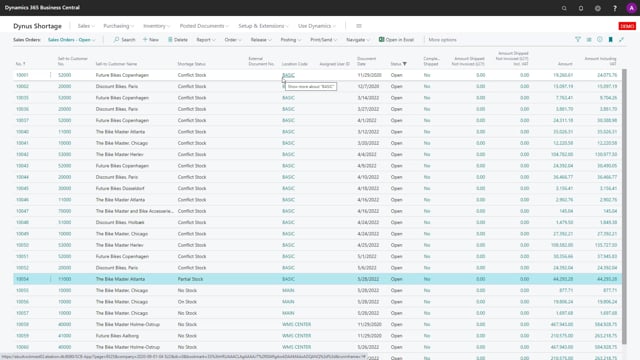


If you run a wholesale or production business in Dynamics 365 Business Central, partial deliveries cost you money and create uncertainty for your customers. The shortage on demand orders functionality helps you avoid that. You calculate the demand on your orders, and the system shows you whether each order has enough stock to be shipped complete or whether it has a shortage.
On sales orders, this prevents partial deliveries that drive up your freight costs. On production orders, it makes sure you can run the full production order without running short on components.
The functionality gives both your salespeople and your warehouse staff a clear view of what can actually be delivered, so you can set the right expectations with your customers.
How the shortage on demand orders functionality works
The core idea is to avoid partial deliveries. On a sales order, the goal is to ship the complete order in one go rather than sending part of it now and the rest later. On a production order, the goal is to make sure you have everything you need to run the full production order without hitting a shortage halfway through.
You run a calculation, and the system then shows you the status of each order. You can see whether an order has no stock or a conflict in stock, meaning the available quantity is not enough to cover all the demand. With that information, you know whether you can ship the complete order or not.
Why avoiding partial deliveries saves money
Every partial delivery means an extra shipment, and every extra shipment costs you money on freight. When you ship orders complete instead of in parts, you cut down on those costs.
There is also a customer service benefit. When you can see up front whether the goods are available, you can set the right expectation with the customer about when they will receive their order. That creates transparency for both the salesperson taking the order and the warehouse staff fulfilling it.
What you should do
If partial deliveries are eating into your freight budget or causing friction with customers, use the shortage on demand orders calculation to check stock availability before you commit to a delivery. It is a practical tool for keeping your shipments complete and your communication with customers honest.
Q&A
What is the purpose of the shortage on demand orders functionality?
It helps you avoid partial deliveries. On sales orders, it ensures you can ship the complete order at once. On production orders, it ensures you can run the full production order without running short on components.
How do you check whether an order can be shipped complete?
You run a calculation, and the system shows you the status of each order. If an order has no stock or a conflict in stock, the available quantity is not enough to cover the full demand, so the order cannot be shipped complete.
How does avoiding partial deliveries save money?
Each partial delivery means an additional shipment, and each shipment adds freight cost. Shipping orders complete instead of in parts reduces those freight costs.
Who benefits from this functionality?
Both salespeople and warehouse staff. It creates transparency about what can actually be delivered, which makes it easier to set the right expectations with customers about whether and when they can receive their goods.