
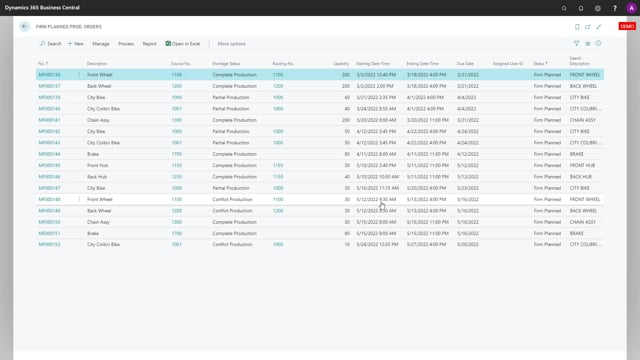


If you work with production orders in Microsoft Dynamics 365 Business Central, you can now calculate whether you have enough material to complete a production order before you release it. The shortage status functionality tells you if a production order is a complete production, a partial production, or a conflict production. A complete production means you can finish the order without affecting other production orders. A conflict production means you can finish this order, but you will then create shortages on other production orders.
You run the calculation with the Calculate Production Order Shortage report. The report mass updates your production orders and works on both firm planned production orders and released production orders. This helps you decide which production orders to set to Released status so you can pick the material and start producing.
Shortage status on production orders
The shortage status on production orders comes together with the shortage status on demand orders. It uses the same logic as the shortage status on sales orders.
For each production order, the calculation tells you one of the following:
- Complete production means you can make the full production order without causing any conflicts on other production orders.
- Partial production or conflict production means you can still make the full production order, but doing so creates shortages on other production orders.
Calculate Production Order Shortage report
To get the status across your production orders, you use the report called Calculate Production Order Shortage. The report lets you mass update and run the calculation on your production orders. It calculates the shortage for both firm planned production orders and released production orders.
Deciding which production orders to release
With this functionality you get a tool that helps you decide which production orders to change to Released status. Once an order is released, you can pick the material for the production and start producing it. Instead of guessing, you can see which orders are ready to go and which ones will create problems for other production if you start them.
Q&A
What is the difference between a complete production and a conflict production?
A complete production means you can finish the full production order without causing any conflicts on other production orders. A conflict production means you can still finish the order, but it creates shortages on other production orders.
Which production orders does the Calculate Production Order Shortage report cover?
The report calculates the shortage for both firm planned production orders and released production orders, and it lets you mass update them in one run.
How does the shortage status help with releasing production orders?
It shows you which production orders you can complete without creating conflicts, so you can decide which ones to set to Released status, pick the material, and start producing.
Does the production order shortage status use the same logic as sales orders?
Yes. The shortage status on production orders follows the same logic as the shortage status on sales orders.