
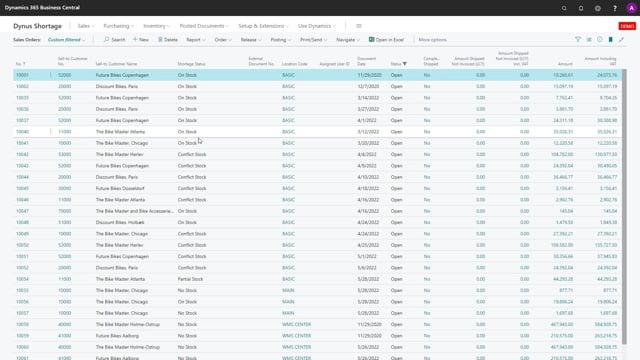


Shortage on Demand Order helps you see whether picking one sales order will create shortages on others. When several sales orders depend on the same limited stock, you can identify the conflicts before you ship, so you can prioritise which orders to fulfil first.
If you include expected supplies and due dates in the calculation, the picture improves. Orders that can already be covered by stock show up as deliverable without conflict, while the remaining orders are flagged so you know they need prioritising.
Seeing conflicts between sales orders before you pick
One of the core ideas behind Shortage on Demand Order is the ability to see if picking a sales order will create conflicts on other sales orders. This matters when you have limited stock and several orders competing for the same items.
In a typical scenario, you might have a list of sales orders that all show conflicts. That tells you something important: when you start picking each of them, the pick will create conflicts on the other sales orders. In other words, fulfilling one order takes stock away from another.
Knowing this up front means you can prioritise your sales orders rather than discovering the problem only when something can’t be shipped.
Including expected supplies and due dates in the calculation
The view becomes much more useful when you run the calculation including expected supplies and due dates. Instead of only looking at what’s on hand right now, the function also takes incoming supply and delivery deadlines into account.
When you do this, the result looks considerably better. The sales orders that are covered by stock can be delivered as things stand without creating any conflicts. The remaining orders are the ones you need to focus on.
Prioritising orders when stock is limited
For the orders that still show conflicts, you need to be aware that shipping to one of them will have an influence on the others. There isn’t enough stock to satisfy everyone at once, so someone has to decide which orders come first.
The point of the function is not to make that decision for you. It gives you the visibility to make an informed call: you can see exactly which orders are safe to deliver and which ones compete for the same stock, so you can prioritise deliberately instead of by accident.
Q&A
What does Shortage on Demand Order show you?
It shows whether picking one sales order will create shortages or conflicts on other sales orders. This lets you spot the problem before you ship and prioritise accordingly.
Why should you include expected supplies and due dates in the calculation?
Including expected supplies and due dates gives a more accurate picture. Orders that can be covered by current stock show up as deliverable without conflict, and the remaining orders are flagged as needing prioritisation.
What happens when several sales orders compete for the same stock?
Shipping to one order will affect the others, because there isn’t enough stock to fulfil all of them at once. The function makes the conflicts visible, but you still need to decide which orders to prioritise.