
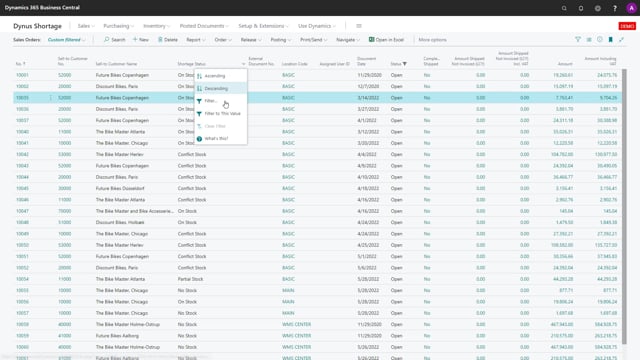


The shortage functionality in Microsoft Dynamics 365 Business Central helps you align expectations between your warehouse staff and your sales department. You run the shortage status report to see which sales orders you can ship right now and which ones compete for the same stock. You filter on in-stock sales orders and release them so the warehouse can ship without delay. For conflicting stock, someone in sales or customer relations prioritises the orders, and the warehouse picks them one by one while recalculating the status on each order to confirm it can still be fully picked.
How the shortage status report sets expectations between warehouse and sales
One of the practical benefits of the shortage functionality is that it makes it easy to set expectations between the warehouse employee and the sales people. When you run the shortage status report, both sides see the same picture of what can actually be shipped.
You filter on all the in-stock sales orders, meaning everything you can ship right now. Once you release those orders, the warehouse can simply go ahead and ship them without any further questions. There is no ambiguity about which orders are ready to go.
Handling conflicting stock and prioritising sales orders
The harder part is the conflicting stock. These are the orders that compete for the same available inventory, so you cannot just release all of them at once. Somebody in the sales department or somebody with customer relations needs to prioritise these orders.
That means deciding which order is the most important. It might be based on the document date, or it might be based on some other criterion that matters to your business. The point is that a person has to make that call and set the priority.
Picking conflicting orders one by one
Once the priority is set, you inform the warehouse staff to pick the conflicting orders one by one. For each order, you recalculate the status to make sure it can still be completely picked.
This step matters because not every order in the conflicting group can be fulfilled. As soon as you start picking stock to one of them, conflicts arise for the others, since the inventory they were all relying on has been allocated. Recalculating after each pick keeps you from promising stock you no longer have.
Q&A
What does the shortage status report show you?
It shows which sales orders you can ship right now from available stock, and which orders are in conflict because they compete for the same inventory. You can filter on the in-stock sales orders to separate what is ready to ship from what needs prioritising.
How do you handle sales orders that are in conflict over the same stock?
Someone in sales or customer relations prioritises them, for example by document date or another business criterion. The warehouse then picks the orders one by one according to that priority, recalculating the status after each pick to confirm the order can still be fully picked.
Why can’t all conflicting orders be fulfilled?
Because they rely on the same available stock. When you start picking to one order, the inventory the other orders depended on is allocated, which creates conflicts for the rest. That is why you recalculate the status on each order before picking it.