
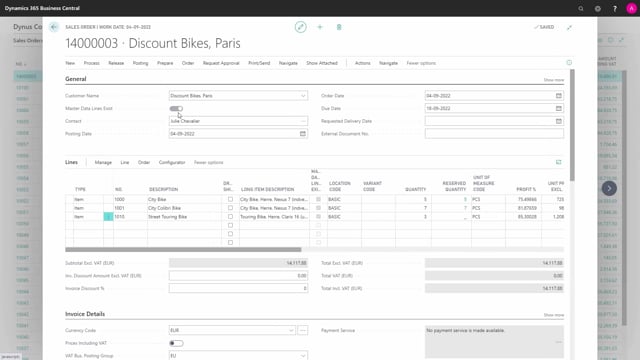


A sales configurator in Microsoft Dynamics 365 Business Central can work in two ways. The common approach creates a new item number for every configured product, which fills your system with items and bills of materials you only use once. The alternative is to build on generic base items and adjust parameters per order, so you avoid creating one-off master data while still keeping full traceability.
With the parameter-based approach, you enter an order line, pick the base item that most closely matches what the customer needs, and then change the parameters such as gear, value, or color to match the customer’s demand. These changes transfer down through the order hierarchy and into the posted documents, so you can find the exact configuration again later.
If you run a configuration setup in Business Central and want to keep your item master clean, choosing the right configurator model matters. Here is how the two approaches compare and what it means for your production orders.
Two approaches to sales configuration in Business Central
The idea behind this sales configurator is to avoid creating a lot of master data. Instead of generating a brand new item every time a customer orders something slightly different, you build on a set of generic base items, each with a bill of materials.
When you create an order, you enter a line with an item number and a quantity, then search for the base item that looks most like what the customer requires. You have several base items to choose from. From there, you adjust the master data and parameters on the line based on the customer’s requirements.
How parameter changes flow through the order hierarchy
When you change a parameter to match what the customer wants, that change carries through the whole structure. You might specify a different gear, a different value, or a different color. These changes transfer down through the order hierarchy and into the posted document.
This has a direct impact on what you actually produce, paint, or process further down the hierarchy. Because the configuration is stored on the posted documents, you can find it again later and see exactly which combination of master data you produced for a given order.
Why creating a new item per configuration causes problems
With a normal configurator that creates a new item each time, your system fills up with items you only produce once and bills of materials you only use once. Over time this clutters your master data and makes the item list harder to manage.
The parameter-based approach avoids this. It gives you more agile functionality, and you still keep full history, so you can look up previous configurations whenever you need them.
The role of the planner in configuring production orders
One of the key principles here is that the planner, or whoever is configuring the product, changes the component list on the top-level production order. Those changes then flow down through the hierarchy so that every adjustment is reflected at the right level.
This means the finished goods take the correct components from stock, or trigger the purchase of the correct components, based on the configured parameters.
Q&A
Why should you avoid creating a new item for every configured product?
Creating a new item each time fills your system with items you only produce once and bills of materials you only use once. This clutters your master data over time. By building on generic base items and changing parameters per order, you keep the item list clean while still producing the right configuration.
How do you keep traceability when using parameter-based configuration?
The parameter changes you make transfer down through the order hierarchy and into the posted documents. Because the configuration is stored on the posted documents, you can find the exact combination of master data you produced for any order later on.
How does the configurator ensure the correct components are used in production?
The planner changes the component list on the top-level production order, and those changes flow down through the hierarchy. As a result, the finished goods take the correct components from stock or trigger the purchase of the correct components based on the configured parameters.