
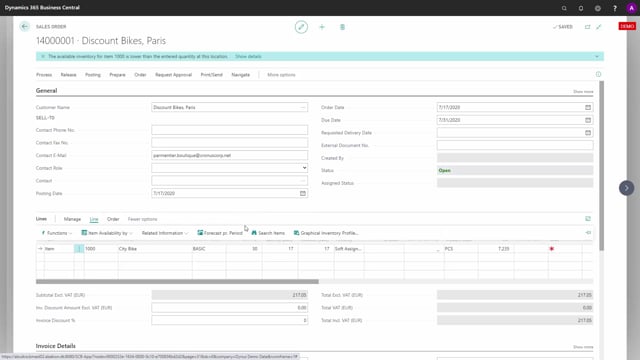


The assigned quantity feature in Business Central lets you assign inventory across companies when you work with intercompany setups. If you sell from a sales company but hold stock in a separate inventory company, you can assign quantities on a sales order line based on what is physically available in the inventory company.
You configure this in the setup, where you define that assignment should pull from your inventory company rather than the company you are working in. When you enter a quantity on a sales order line, the system assigns what is available in the inventory company, even though the sales company shows zero on stock.
This is useful if you run sales companies or a sales hub and want to assign directly against the inventory held in your inventory companies.
Assigning quantities across companies in an intercompany setup
With the assigned quantity feature, you can assign stock from companies other than the one you are currently working in. If you use intercompany and work in a sales company, you can view the inventory profile in a separate inventory company and assign from there.
Here is a practical example. Say you enter a quantity of 30 on a sales order line in the sales company. The system assigns 17. At first glance this looks odd, because the sales company itself has nothing on stock.
Why the system assigns a quantity when local inventory is zero
If you look at the inventory profile in the sales company without using assigned quantity, you see that there is zero inventory. The only thing showing is the sales order with the quantity of 30. The item simply is not on stock in this company.
So why did it assign 17 when there is nothing on inventory? Because the setup defines that the assignment should come from the inventory company, not the company you are working in. The assigned quantity calculation looks at the inventory company instead.
When you view the profile in the inventory company, you see 17 on inventory there. That is where the 17 comes from.
When to use this functionality
This setup is for businesses that run separate sales companies or a sales hub alongside one or more inventory companies. It lets you assign quantities directly based on the stock available in your inventory companies, rather than being limited to what the local company holds.
Q&A
Can you assign inventory from a different company than the one you are working in?
Yes. With the assigned quantity feature in an intercompany setup, you can assign stock from another company. If you work in a sales company, you can assign based on the inventory held in a separate inventory company.
Why does the system assign a quantity when the local company shows zero stock?
Because the setup defines that assignment should come from the inventory company rather than the company you are working in. The assigned quantity calculation looks at the inventory company, so it assigns from the stock available there.
Who benefits from assigning quantities across companies?
Businesses that run separate sales companies or a sales hub alongside one or more inventory companies. The feature lets you assign quantities directly based on the stock in your inventory companies.