
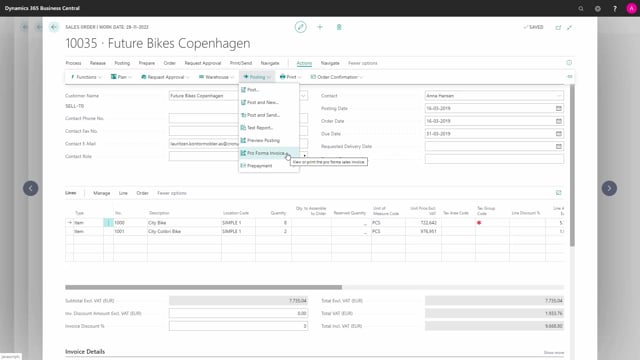


In Microsoft Dynamics 365 Business Central, you can print or preview a pro forma invoice directly from both a sales invoice and a sales order. You find the function under Actions, then Posting, then Pro Forma Invoice. The pro forma invoice does not post any entries. It only gives the customer a preview of the invoice before the real one is created.
Printing a pro forma invoice from a sales invoice
From the sales invoice, you can print a pro forma invoice. Go to Actions, then Posting, then Pro Forma Invoice. From here you can either print the pro forma invoice or open a preview of it.
Printing a pro forma invoice from a sales order
You can also print a pro forma invoice directly from a sales order. The steps are the same as on the sales invoice. Go to Actions, then Posting, then Pro Forma Invoice.
Q&A
Where do I find the pro forma invoice function in Business Central?
You find it under Actions, then Posting, then Pro Forma Invoice. It is available on both the sales invoice and the sales order.
Can I preview a pro forma invoice before printing it?
Yes. When you run the function from a sales invoice, you can choose to either print the pro forma invoice or open a preview of it.
Can I print a pro forma invoice from a sales order?
Yes. You can print a pro forma invoice from both a sales order and a sales invoice, using the same steps under Actions, Posting, Pro Forma Invoice.