
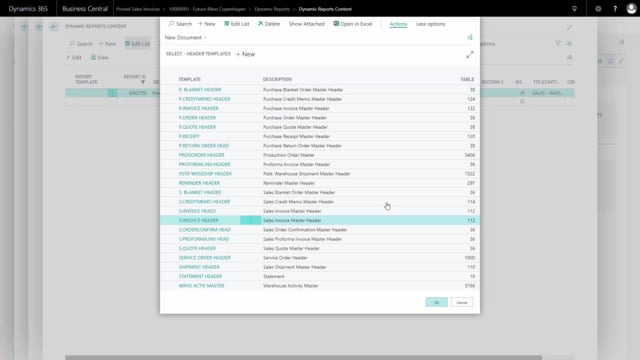


Creating header templates in the detail setup
When you work with document templates, you sometimes need a new header template to control how a document is set up. You add and manage these templates directly from the detail setup, and you can either build one from scratch or base it on an existing template.
To add a new header template, go into the detail setup and look up the value in the header, then select from the full list. This opens the complete list of header templates, where you get an overview of every template already defined.
Building a new template from scratch or from a copy
From the full list you have two options. You can create a template from scratch by pressing New. Or you can create a new template based on an existing one, which saves time when the new template only differs slightly from one you already have.
To copy an existing template, go into Actions and choose Copy to new. You give the new template a name, and the system creates it for you. When you press OK, the new template is applied to the document you are currently working on.
Editing a copied template without affecting the original
When you copy a template and then edit the new version, the changes stay isolated to that new template. The header template you copied from is not affected. This means you can adjust a copied template freely without worrying about breaking the original it was based on.
Q&A
How do you add a new header template?
Go into the detail setup, look up the value in the header, and select from the full list. From there you can press New to create one, or copy an existing template.
Can you create a header template based on an existing one?
Yes. Open the full list of header templates, go into Actions, and choose Copy to new. Give the new template a name, and the system creates it.
Does editing a copied header template change the original?
No. When you edit a template that you copied, the changes apply only to the new template. The template you copied from stays unchanged.
How do you apply a new header template to the document you are working on?
After creating or copying the template, press OK. The template is then used on the document you are currently working on.