


When a document has more lines than fit on a single page, it continues onto a second page. On that second page, you won’t see any address information or the details from the header. To make sure you can still tell which document the page belongs to, Dynamics Report adds a heading showing the document number. This article explains how that works and how you can change the heading text.
You can edit the caption used for the document number on page two through the document setup. The caption is fully configurable, so you can adjust the wording to suit your needs.
Why page two looks different from page one
Page two is much simpler than page one. When a document contains more lines than can fit on one page, it continues onto a second page. That continuation page does not repeat the address information, and it does not include the details from the header.
To identify which document a continuation page belongs to, a heading showing the document number is added at the top of page two. This gives you a clear reference back to the original document even though the rest of the header information is left out.
How to change the document number heading on page two
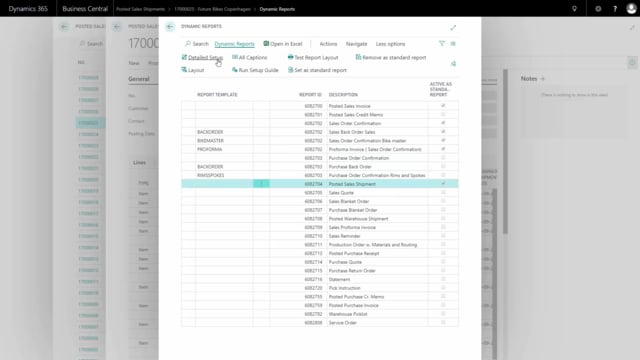
The heading for the document number can be changed in the document setup. Here is how to do it in Dynamics Report:
- Mark the document you want to edit.
- Press Detail Setup.
- Edit the card.
- Go to the Captions section.
Under Captions, you will find the caption for the document number on page two. This is where you change the text that is used for the heading. Adjust the caption to whatever wording fits your documents.
Q&A
Why doesn’t page two of my document show address and header information?
Page two is a continuation page and is intentionally simpler than page one. It does not repeat the address information or the header details. Instead, it shows the document number as a heading so you can identify which document the page belongs to.
How do I change the document number heading on page two?
Open Dynamics Report, mark the document, press Detail Setup and edit the card. Go to the Captions section, where you will find the caption for the document number on page two. Change the caption there to update the heading text.
How does page two identify which document it belongs to?
A heading containing the document number is added to page two. This lets you trace the continuation page back to the original document even though the address and header information are not repeated.