


When you build document layouts in Business Central, you are not limited to the fields in the table you are working with. You can link to another table and pull in the information you actually want to print. A common example is showing the salesperson’s name on a document instead of just the salesperson code.
This guide explains how to set up that link in a header template so the printed document shows the full name rather than the code.
Choosing fields in the header template
In the header template, you can choose from all the fields in the table you are working with. That covers most of what you need, but sometimes the value stored in the table is a code, not the readable text you want on the final document.
For instance, a document holds the salesperson code, but you want to print out the actual name of the salesperson. The name is not stored on the document itself. It lives in another table.
Linking to another table to fetch the name
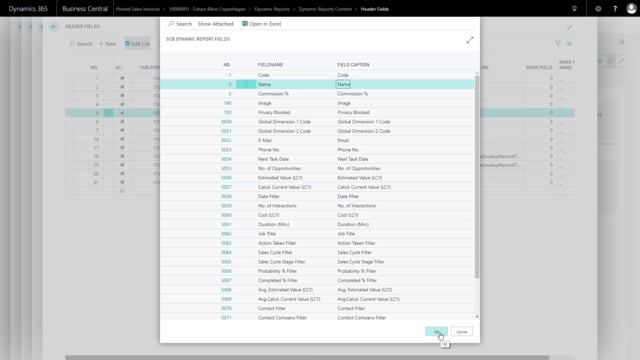
To get the name onto the document, you link the field over to the table where the name is stored. You do this with the using table and value commands.
Start by finding the table where the information is stored. In this case, that is table 13, Salesperson/Purchaser. Once you have selected the table, you choose the field you want to come out on the document. You can choose from all the fields in that table, but here you want Name.
The result on the printed document
When you print out the document, the salesperson now comes out with the name instead of just the salesperson code. The link does the lookup for you, so the readable name appears in place of the code every time the document is generated.
Q&A
Can I show a salesperson’s name on a document instead of the salesperson code?
Yes. The name is stored in another table, so you link the field over to table 13, Salesperson/Purchaser, and select the Name field. When you print the document, the name appears instead of the code.
Which table holds the salesperson name in Business Central?
The salesperson name is stored in table 13, Salesperson/Purchaser. You point your link to this table and choose the Name field.
How do I pull information from another table into a document layout?
In the header template, use the using table command to select the table where the information is stored, then use the value command to choose the specific field you want on the document. This links the value across so it prints on the final document.