
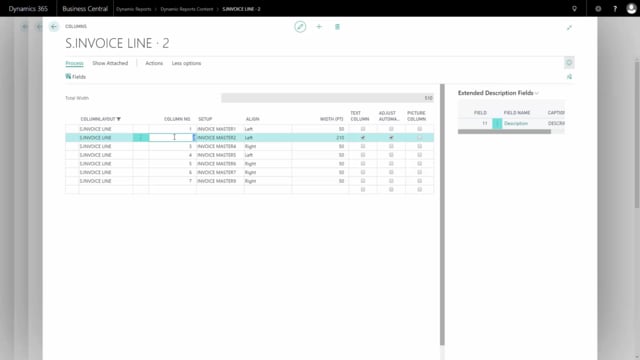


You can add extra fields to a column in a Dynamic Report without rebuilding the layout. By editing the column setup, you can show information such as an order number directly beneath the item description, with or without a heading. This is useful when you want more detail in an existing column without creating a separate one.
You add the field through Detail Setup and Column Setup, look up the value you want, and give it a caption. You control where the caption appears using two options: Add caption to line places the heading in front of the information, and a separate setting lets you hide the caption in the column header.
Adding an extra field to a column in a Dynamic Report
To add additional information to a column in a Dynamic Report, start by marking the document and clicking Detail Setup. From there, find the Column Setup under Dynamic Report.
Identify the column where you want to add the extra information. This is often the column that contains the description. Mark that column and click Fields.
Add a new line, then tap to look up the value you want to add. You can choose from all the available fields. In this example, the field added is the order number.
Setting a caption for the field
Once you have added the field, you can add a caption for its heading. This caption controls how the field is labelled in the report.
If you want the heading to appear in front of the information itself, mark Add caption to line. If you instead want to hide the caption in the column header, mark the corresponding option. Both settings are covered in separate videos.
The result in the report
After applying the setup, the order number appears in the description column, directly beneath the description of the item. The caption you chose is visible as a heading in the column header.
Q&A
How do I add an extra field to a column in a Dynamic Report?
Mark the document and click Detail Setup, then open Column Setup under Dynamic Report. Identify the column you want, mark it, click Fields, add a new line, and look up the value you want to add.
Which column should I add the extra information to?
This is often the column that contains the description, so the additional information appears together with the item description.
How do I place the heading in front of the information?
Mark the Add caption to line option. This puts the caption in front of the field’s information on the same line.
How do I hide the caption in the column header?
Mark the setting that hides the additional caption in the header of the column.
Where does the added field appear in the report?
The added field, such as the order number, appears in the description column directly beneath the description of the item. The caption you chose shows as a heading in the column header.