
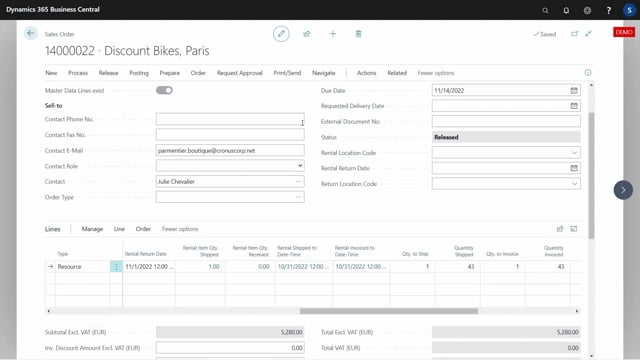


In Microsoft Dynamics 365 Business Central rental scenarios, the rental period continues automatically as long as the customer keeps the rented items. Each time you run the invoicing job, the system postpones the rental period to cover another month.
The rental period stops automatically when you receive the inbound transfer line back. This is what tells the system that the item has been returned.
You return items in two steps by default: ship the item from the customer side, then receive it back. You can configure the setup to do both in one go if you prefer.
After you post the return, the system sets the closing date to the day after the final receipt date. The rental is then ready to be invoiced up to that final receipt date.
How the rental period continues until items are returned
As long as the customer keeps the rental items, the rental period does not end. Every month when you run the invoicing job, the system postpones the rental period. The rental period only stops automatically when you receive the inbound transfer line back.
On the rental line you can see whether the item has been returned. If the inbound transfer is not yet packed, the rental is still running.
Posting the return of rented items
To return the item, open the inbound transfer and enter the quantity you are returning along with the date. For example, if today is the 15th of November and that is the date you are posting the return, you use that date on the line.
When you update the order manually, you need to reopen the line first. After reopening it, you can register that the item is received back on the 15th of November.
In this example, the rental was only invoiced up to October 30. When you post the return, you ship the item from the customer side and bring it back into your own stock.
Returning items in one step or two steps
By default the return happens in two steps: you ship the item, then you receive it. If you have made the setup for it, you can do both in one go instead.
Once you have shipped one and received one, the transfer is deleted and the rental line gets an actual ending date.
Closing date and final invoicing
After the final receipt, the closing date updates to the day after the final receipt. In this example the receipt was posted on November 15, so the closing date becomes November 16.
The rental is now ready to be invoiced up to that final receipt date.
Q&A
When does the rental period end in Business Central?
The rental period does not end while the customer keeps the items. Each time you run the invoicing job, the system postpones the rental period by another month. The period stops automatically when you receive the inbound transfer line back.
How do you register that a customer returns rented items?
Open the inbound transfer, enter the returned quantity and the return date. If you are updating the order manually, reopen the line first, then post the return so the item is shipped from the customer side and received back.
Can you ship and receive a rental return in one step?
Yes. By default the return is done in two steps, but if you make the setup for it, you can ship and receive the item in one go.
What date is used for the rental closing date?
The closing date is set to the day after the final receipt date. If you post the receipt on November 15, the closing date becomes November 16, and the rental can be invoiced up to the final receipt date.