
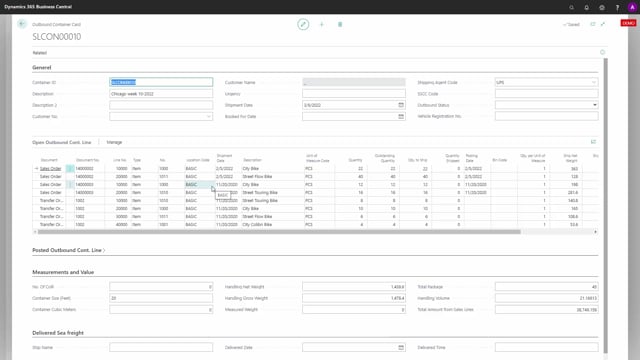


The sales container handling functionality in your Microsoft business solution gives you a clear overview of the containers you are about to ship on the outbound side. Instead of tracking shipments line by line, you work from a container view that shows everything you need in one place.
For each container you can see its current status, whether it is completed, shipped, packing completed, ordered, received or ramped. You also get the date you intend to ship it, so you always know where each container stands in the process.
See which order lines are packed on each container
When you open an individual container, you can see exactly which lines are packed, or are going to be packed, in that container. This includes both sales order lines and transfer order lines, so you get the full picture regardless of where the goods are coming from.
The point of this is straightforward: you get an overview of all your outbound activity organised by container rather than scattered across individual orders.
Q&A
What does sales container handling give you an overview of?
It gives you an overview of the containers you are going to ship on the outbound side, including their status, shipping date and the order lines packed in each container.
Which statuses can a container have?
A container can be completed, shipped, packing completed, ordered, received or ramped.
What types of order lines can be packed in a container?
You can pack both sales order lines and transfer order lines in a container.