
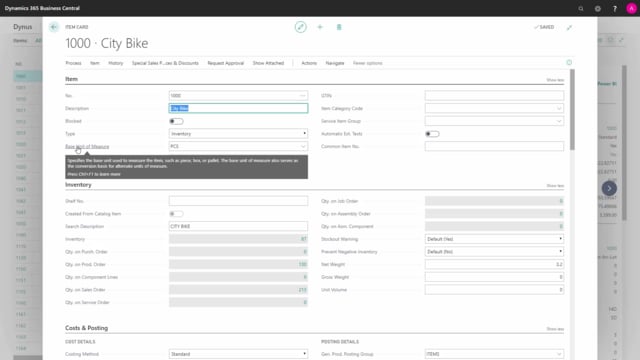


When you create a new item in Business Central, you need to fill out a handful of basic fields that apply across departments. Whether the item is a sales item, a purchase item, or something else, these fields must be entered for every item. There are around seven of them, and this article walks through what they are and why a few of them deserve extra attention.
The most important point to remember is that two of these fields, the base unit of measure and the costing method, are difficult to change once you have posted transactions on the item. Choose them carefully from the start.
Item number must be unique
Every item needs a unique item number. You can enter it manually, which is what most of our clients do, or you can let Business Central assign it from a number series that counts up by one each time. Either way, the number has to be unique.
Item description is recommended but not mandatory
The item description is not actually a mandatory field. In practice you will almost always fill it in anyway, because it tells you what the item is when you sell it, purchase it, and handle it. So even though the system does not force you to enter it, you should normally do so.
Base unit of measure is mandatory and hard to change
The base unit of measure is a mandatory field. Here you enter the base unit that the item is normally handled in within your inventory, at the lowest level. This is your counting unit of measure.
Be aware that this field cannot be changed easily once you have posted transactions on the item. Get it right before you start using the item.
Costing method on the Costing tab
On the Costing tab you find the costing method, which is also a mandatory field. The most common choices are FIFO (first in, first out) and Standard. We cover the different costing methods in more detail in a separate article.
Like the base unit of measure, the costing method is complex and time-consuming to change once you have posted on the item. Think carefully about what you select here.
Posting groups determine the accounting
Finally, you need to fill in the posting groups: the general product posting group, the VAT product posting group, and the inventory posting group. These determine where the postings for an item end up in the chart of accounts, whether in the income statement or on the balance sheet, when you handle the item.
These are mandatory fields that you should enter on all your items.
Q&A
Which fields are mandatory when creating a new item in Business Central?
The mandatory basic fields are the item number, the base unit of measure, the costing method, and the posting groups (general product posting group, VAT product posting group, and inventory posting group). The item description is not mandatory, but you should normally fill it in anyway.
Can I change the base unit of measure after posting on an item?
No, the base unit of measure cannot be changed easily once you have posted transactions on the item. Set it correctly before you start using the item.
Can I change the costing method after posting on an item?
Changing the costing method after you have posted on an item is complex and time-consuming. Decide on the right method, such as FIFO or Standard, before you begin posting.
What do the posting groups on an item control?
The posting groups determine where the postings for an item are placed in the chart of accounts, either in the income statement or on the balance sheet, when you handle the item.
Do I have to enter the item number manually?
No. You can enter it manually, which most clients do, or you can let Business Central assign it automatically from a number series. Either way, the item number must be unique.