
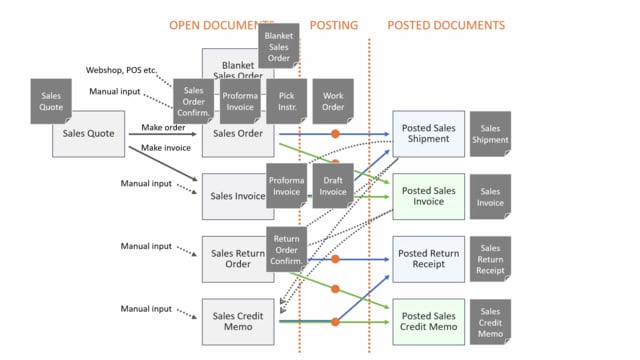


Business Central includes a wide range of sales documents, and at first glance it can look like a lot to keep track of. But the structure is more logical than it appears. All the open sales documents share the same underlying table structure, and the posting routine works much the same way across all of them. The difference you see as a user comes from a single field on the table that distinguishes a sales order from a sales invoice, a sales quote, a return order, and so on.
You handle the sales order with shipment and invoicing as two separate posting steps, while a sales invoice posts both the shipment and the invoice in one step. The same logic applies in reverse for return orders and credit memos. You can also enable archiving in the Sales & Receivables Setup to keep a history of your open documents.
How sales documents share the same table structure
There are quite a few sales order documents in Business Central, both open documents and posted documents. The open documents are all based on the same table structure, meaning they come from the same tables. A field on the table distinguishes whether it is a sales order, a sales invoice, a sales quote, a return order, and so on. The same applies to the posted documents.
So even though the table structure is simple and the posting routine is very much alike for all of the documents, it looks different from the user’s point of view.
Sales quotes, blanket orders, and sales orders
Among the open documents, you have a sales quote or a sales blanket order, both of which can be turned into a sales order. You can also create a sales order manually by entering it, or it can come from connections such as webshops or point of sale solutions.
The sales order is a document where you handle the shipment and the invoice posting in separate steps. When you post from the sales order, you can post the shipment, which creates a posted sales shipment. That is about quantities, the pieces on the shipment. Later on, you can post a sales invoice, which creates a posted sales invoice. That is about amounts.
These two actions are normally not done at the same time. Typically the warehouse staff post the sales shipment, and the finance department post the sales invoice.
Sales invoices posted in a single step
A sales invoice is also an open document in Business Central. You can create it manually, make it from a sales quote, or import it from different sources.
When you post the sales invoice, it posts the posted shipment and the posted sales invoice at the same time. So with a sales invoice you would normally create it and post it directly afterwards, whereas a sales order stays open for longer, until it is picked and shipped.
Sales return orders and sales credit memos
The sales return order and the sales credit memo have the same functionality as the sales order and invoice, but the other way around.
The return order lets you post the receipt and the invoicing in two steps, whereas the credit memo posts in one step. You can create a sales return order manually, or from a posted shipment, a posted invoice, or other posted sales documents. There is functionality to import the posted documents so you can revert them. The same applies to the sales credit memo, where you can import from the posted documents to reverse them.
The posted return order and the sales credit memo both create posted return receipts, which have to do with quantities. The posted sales credit memo has to do with amounts. Again, from the return order the posting is done in two steps, but from the credit memo it is one step.
Archiving open sales documents
You can set up archives in the Sales & Receivables Setup. If you do, you can archive sales quotes, blanket orders, sales orders, and sales return orders. Different actions on the open documents can create an archive entry, so you can see the history on the order.
There is also archiving functionality when printing a sales document. A checkmark lets you archive the document before invoicing it.
That covers the open documents, the posted documents, and the archiving on top. In addition to all these documents, there are printed documents that you send to your customer, and those are covered separately.
Q&A
What is the difference between a sales order and a sales invoice in Business Central?
With a sales order you post the shipment and the invoice as two separate steps, so the warehouse can post the shipment and finance can post the invoice later. With a sales invoice both the posted shipment and the posted sales invoice are posted at the same time, in a single step.
Why do all sales documents in Business Central look different even though they share the same structure?
The open sales documents come from the same tables and use much the same posting routine. A field on the table distinguishes whether the document is a sales order, sales invoice, sales quote, return order, and so on, which is why they appear different to the user.
What is the difference between a sales return order and a sales credit memo?
The sales return order lets you post the receipt and the invoicing in two separate steps. The sales credit memo posts in one step. Both create posted return receipts for quantities, and the posted credit memo handles amounts.
How do you create a sales return order from existing documents?
You can create a sales return order manually, or import it from a posted shipment, posted invoice, or other posted sales documents. This lets you revert the original posted document.
How do you keep a history of sales orders in Business Central?
Enable archives in the Sales & Receivables Setup. You can then archive sales quotes, blanket orders, sales orders, and sales return orders. Different actions create archive entries, and you can also archive a document before invoicing it using a checkmark when printing.