
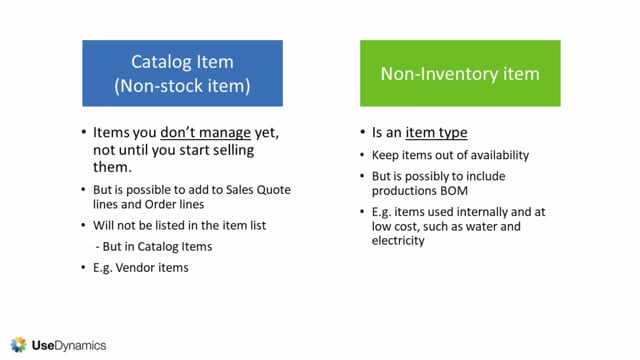


In Business Central, catalog items and non-inventory items are two different things that are easy to confuse. A catalog item, also called a non-stock item, is an item you don’t manage in Business Central until you start selling it, but you can still add it to sales quotes and orders. A non-inventory item is a regular item with the item type set to non-inventory, which keeps it out of availability overviews while still allowing it to be part of production bills of materials.
You find catalog items in the catalog items list, not in the normal item list. Use them for things like vendor items you know your vendor supplies but don’t want sitting in your system as regular items yet.
You use non-inventory items for things you consume internally at low cost, such as water and electricity.
Catalog items and non-stock items in Business Central
A catalog item, also known as a non-stock item, is an item that you don’t yet manage in your Business Central. You only start managing it once you begin selling it.
Even though you don’t manage these items, you can still add them to sales quote lines and sales order lines. A catalog item does not appear in the regular item list. Instead, you find it in the catalog items list.
A typical example is vendor items. You know your vendor supplies them, but you don’t want them lying around in your system as normal items until you have actually started selling them.
Non-inventory items as an item type in Business Central
Non-inventory items are regular items that you give the type non-inventory. It is an item type, not a separate list like catalog items.
You use this item type when you want to keep the items out of availability overviews. Even so, you can still include non-inventory items in production bills of materials.
Examples of non-inventory items are things you use internally at low cost, such as water and electricity.
Catalog items versus non-inventory items
The two are not the same, and mixing them up can lead to setup that doesn’t match what you actually need.
A catalog item is about items you don’t manage yet because you haven’t started selling them. A non-inventory item is an item type for items you do manage but want to keep out of availability overviews. Knowing the difference helps you decide where each item belongs in your setup.
Q&A
What is a catalog item in Business Central?
A catalog item, also called a non-stock item, is an item you don’t manage in Business Central until you start selling it. You won’t find it in the regular item list, but in the catalog items list. You can still add it to sales quote lines and sales order lines.
What is a non-inventory item in Business Central?
A non-inventory item is a regular item given the item type non-inventory. The type keeps the item out of availability overviews, but you can still include it in production bills of materials. Examples are items you use internally at low cost, such as water and electricity.
What is the difference between catalog items and non-inventory items?
Catalog items are items you don’t manage yet because you haven’t started selling them, and they live in a separate catalog items list. Non-inventory items are an item type for items you do manage but want to keep out of availability overviews.
Why would you use a catalog item instead of a normal item?
You use a catalog item for things like vendor items you know your vendor supplies but don’t want lying around in your system as normal items until you have started selling them.