
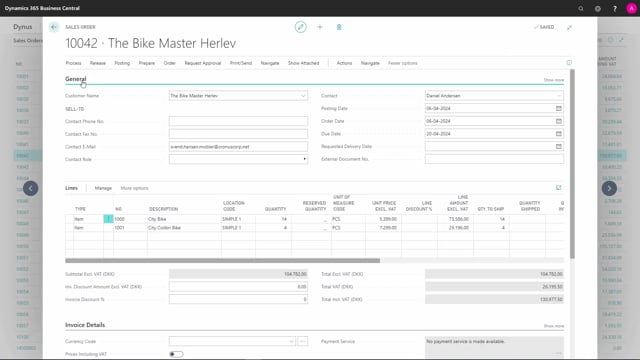


The sales order in Microsoft Dynamics 365 Business Central groups its fields into tabs so you can navigate the document more easily. The main tabs are General, Lines, Invoice Details, Shipping and Billing, Foreign Trade, and Prepayment.
You use the General tab to state which customer the order is for and to fill in the relevant dates. The Lines section is where you add the products, and it works as a subpage rather than a regular tab. Subtotals are calculated automatically just below the lines.
You set up payment terms in Invoice Details, define delivery and billing addresses in Shipping and Billing, handle export-related fields in Foreign Trade, and manage prepayments in the Prepayment tab.
How fields are organised on the sales order
On a sales order in Business Central, the fields are grouped into tabs. This grouping makes it easier to find what you need and to navigate the document without scrolling through every field at once.
The General tab: customer and dates
The first tab on the sales order is the General tab. Here you state which customer the order is for. The dates relating to the document are also filled out here.
The Lines section: adding products
Next come the lines. The lines aren’t really a tab in the same sense as the others. They are a subpage. This is where you add the items on the order. The fields and functions on the sales line are covered in a separate set of videos.
Subtotals are calculated automatically
Just below the lines you find the subtotals. These are calculated automatically, so you don’t have to fill them in yourself.
Invoice Details: payment terms
In Invoice Details you specify the payment of the sales order.
Shipping and Billing: delivery and invoice recipient
In Shipping and Billing you define where the order should be shipped to and who should receive the bill.
Foreign Trade: fields for export and selling abroad
In Foreign Trade you set up the fields that have to do with selling abroad.
Prepayment: handling advance payments
If you work with prepayments, you set this up in the Prepayment tab.
Q&A
Which tabs are available on a sales order in Business Central?
A sales order has the following tabs: General, Lines, Invoice Details, Shipping and Billing, Foreign Trade, and Prepayment. The lines are technically a subpage rather than a standard tab.
Where do you state the customer on a sales order?
You state the customer on the General tab, which is the first tab on the sales order. The relevant document dates are also filled in here.
Are subtotals on a sales order calculated automatically?
Yes. The subtotals appear just below the lines and are calculated automatically, so you don’t have to enter them manually.
Where do you set payment terms on a sales order?
You specify the payment terms in the Invoice Details tab.
Where do you define the shipping address and invoice recipient?
You define where the order should be shipped to and who should receive the bill in the Shipping and Billing tab.
Where do you handle prepayments on a sales order?
If you work with prepayments, you set them up in the Prepayment tab.