
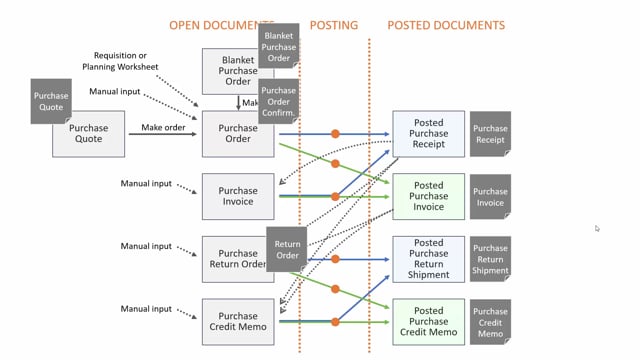


In Business Central, posting a purchase document moves it from the open purchase documents into one of four posted document types. You get a posted purchase receipt for quantity handling, a posted purchase invoice for the money side, a posted return shipment when you send goods back, and a posted purchase credit memo for the financial reversal of a return.
You can create more than one posted purchase receipt from a single purchase order. If you receive only part of the ordered quantity, Business Central creates a separate receipt for each delivery.
The posted purchase credit memo works like the posted purchase invoice, but with the figures reversed.
The four posted purchase documents in Business Central
When you work with purchases in Business Central, you start with open purchase documents. Once you post them, they move into the posted documents area. On the purchase side, you end up with four types of posted documents:
- Posted purchase receipt – handles the quantity, meaning what you have received.
- Posted purchase invoice – handles the money, meaning what you are invoiced for.
- Posted purchase return shipment – handles the quantity when you return goods to the vendor.
- Posted purchase credit memo – handles the money side of a return.
Posted purchase receipt and partial deliveries
The posted purchase receipt is normally the first document you create on a purchase order. It documents the quantity you have received. You will find it as a list of all your receipts, and each receipt shows its lines.
You can create more than one receipt from the same purchase order. If a vendor delivers only part of the quantity you ordered, you post a receipt for what arrives, and you post another receipt later when the rest comes in.
Posted purchase invoice handles the money
The posted purchase invoice is created when you invoice the purchase order. While the receipt covers the quantity, the invoice covers the money. This split lets you keep track of what you have physically received separately from what you have been billed for.
Posted return shipment and credit memo for returns
When you send goods back to a vendor, you create a posted purchase return shipment. This is the return equivalent of the receipt and records the quantity of items you have sent back.
The posted purchase credit memo is the last of the posted documents on the purchase side. It works like the posted purchase invoice, but with the figures reversed, so it handles the money side of a return.
All four posted documents are built in basically the same way, so once you know how to read one, you can read them all.
Q&A
What are the four posted purchase documents in Business Central?
The four posted purchase documents are the posted purchase receipt for quantity, the posted purchase invoice for money, the posted purchase return shipment for returned quantities, and the posted purchase credit memo for the money side of a return.
Can you create more than one posted purchase receipt from a single purchase order?
Yes. If you receive only part of the ordered quantity, Business Central creates a separate posted purchase receipt for each partial delivery.
What is the difference between a posted purchase receipt and a posted purchase invoice?
The posted purchase receipt handles the quantity, meaning what you have received. The posted purchase invoice handles the money, meaning what you are invoiced for when you invoice the purchase order.
How does a posted purchase credit memo relate to a posted purchase invoice?
The posted purchase credit memo works like the posted purchase invoice, but with the figures reversed. It handles the money side of a return.
Which posted document do you use when returning goods to a vendor?
You use the posted purchase return shipment to record the quantity of items sent back to the vendor, and the posted purchase credit memo to handle the corresponding money side.