
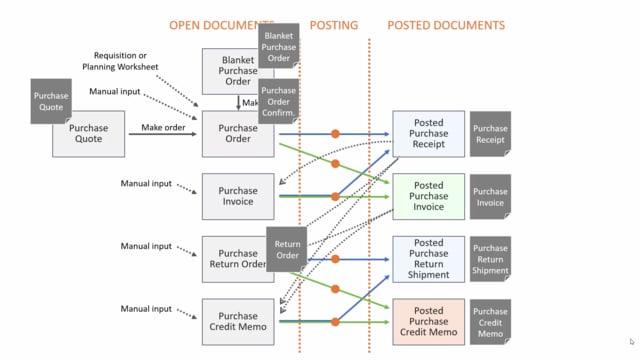


Business Central gives you a set of printing options tied to the different purchase documents. The documents fall into two groups: open documents that you work on before posting, and posted documents that you create when you post. The open documents are normally deleted when the remaining quantities have been posted, so most of the printouts you keep for archiving come from the posted side.
From a purchase order you print a purchase order confirmation to send to the vendor. From a purchase quote you print a quote that you send to the vendor as a PDF, and the vendor can respond on quantities and prices. A purchase blanket order produces a document you send to the vendor as a confirmation of what you agreed.
The posted purchase receipt shows all the lines received on a purchase order. This is useful when you receive goods on the ramp without advanced warehouse management and you need a document to put the items away in stock.
The purchase invoice document is only available from the posted purchase invoice. The open purchase invoice has no print document. You normally use the posted purchase invoice printout for archiving, not for sending to the vendor. When you post, you can select Post and Print to print it and archive it as a PDF.
A purchase return order has a return order document you can use to communicate with the vendor. It works like an order confirmation, but with the quantities the other way around. The posted purchase return shipment works like a purchase receipt, and you would normally post it when packing the goods into a box and sending them back. You can give the return shipment to the logistics person, and the vendor can use it to check the goods when they arrive.
The posted purchase credit memo is another document you print for archiving purposes.
Open documents and posted documents in the purchase process
In Business Central you start with open documents and turn them into posted documents when you post. The open documents are normally deleted once the remaining quantities on the document have been posted. This means you should not rely on open documents for anything you want to keep long term. For archiving, you print from the posted documents.
Printing options for each purchase document
Each purchase document type has its own print option:
- Purchase order: Print a purchase order confirmation to send to the vendor.
- Purchase quote: Print a quote as a PDF and send it to the vendor, who can respond on quantities and prices.
- Purchase blanket order: Print a document you send to the vendor as confirmation of what you agreed.
- Posted purchase receipt: Print a document listing all lines received on the purchase order, useful for putting items away in the warehouse.
- Posted purchase invoice: Print for archiving. The open purchase invoice has no document, so the printout always comes from the posted invoice.
- Purchase return order: Print a return order document to communicate with the vendor.
- Posted purchase return shipment: Print a document, much like a purchase receipt, to send back to the vendor with the goods.
- Posted purchase credit memo: Print for archiving.
Documents you send to the vendor versus documents you archive
Some documents are meant for communication with the vendor: the purchase order confirmation, the purchase quote, the blanket order, the return order, and the return shipment. Others are mainly for your own records. The posted purchase invoice and the posted purchase credit memo are not sent to the vendor. You print and archive them as PDF files. When posting an invoice, the Post and Print option handles both steps in one go.
Using the receipt and return shipment in the warehouse
The posted purchase receipt is helpful if you receive goods on the ramp and do not use advanced warehouse management. You print it and use it to put the items away in stock. The posted purchase return shipment works the same way in reverse. You post it when packing goods to return, hand it to the logistics person, and the vendor can check it against the goods when they arrive.
Q&A
Can you print a document from an open purchase invoice in Business Central?
No. The open purchase invoice has no print document. The invoice document is always printed from the posted purchase invoice. Use Post and Print when posting to print it and archive it.
What happens to open purchase documents after posting?
Open documents are normally deleted once the remaining quantities on the document have been posted. The posted documents remain and are what you use for archiving and reference.
Which purchase documents are meant to be sent to the vendor?
The purchase order confirmation, the purchase quote, the blanket order, the purchase return order, and the posted purchase return shipment are intended for communication with the vendor. The posted purchase invoice and posted purchase credit memo are for your own archiving.
How can the posted purchase receipt help in the warehouse?
If you receive goods on the ramp without advanced warehouse management, you can print the posted purchase receipt and use it as a document to put the items away in stock.