
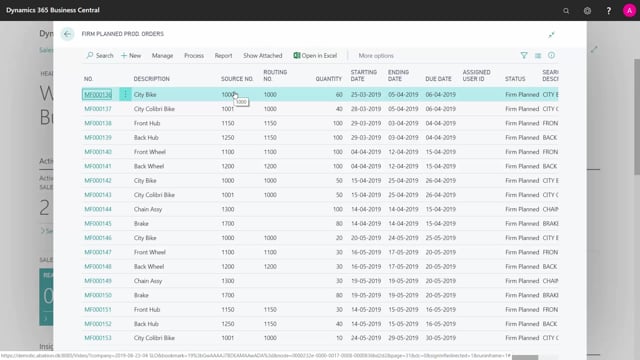


Master planning in Microsoft Dynamics 365 Business Central breaks down your production order demands into two concrete outputs: firm planned production orders and purchase orders. You run it from the planning worksheet to see exactly what you need to release, and when, to cover your demand.
Each firm planned production order carries both material requirements and capacity requirements. You drill into the order lines to see which components an order needs, and into the routing to see the capacity it requires on your work centers.
The allocated capacity entries from the routing feed directly into the work center load. These are the entries you use for capacity planning.
What master planning produces in the planning worksheet
When you run master planning in the planning worksheet, the result is a set of firm planned production orders and purchase orders that fulfill your production order demands. The output is a complete list of what you expect to release, with the dates attached.
You can set this up across whatever planning horizon makes sense for your operation. For example, the list might run from two weeks ahead out to three months. Everything you expect to release shows up with its planned release date.
Material requirements and capacity requirements on each production order
Every firm planned production order created by master planning holds two types of requirements:
- Material requirements, visible on the component lines of the order. Open the order, look at the lines, and you see the expected components for an order of that type.
- Capacity requirements, visible in the routing. The routing shows the expected capacity need for the order.
This is the core purpose of master planning: take your demand and break it down into concrete material and capacity needs you can plan around.
From routing to capacity planning
You can follow the chain from the routing all the way into your capacity planning. Navigate from a routing line into the allocated capacity to see how much capacity the order consumes.
These allocated capacity entries are the ones that show up in the work center load. They give you the data you need to plan capacity properly, rather than guessing where your work centers will be under pressure.
Q&A
What does master planning in Business Central produce?
It produces firm planned production orders and purchase orders that fulfill your production order demands. You see a complete list of what to release and when, across your chosen planning horizon.
Where do I see the material requirements for a planned production order?
Open the production order and look at the component lines. They show the expected components needed for an order of that type.
How do I get from the routing to capacity planning?
Navigate from a routing line into the allocated capacity. Those entries appear in the work center load and are what you use for capacity planning.