


Document handling for Business Central lets you send personalized emails that your recipients will trust. System-generated emails often get ignored or mistaken for spam because they are not personalized and the recipient cannot understand them. That hurts your brand and delays your payments.
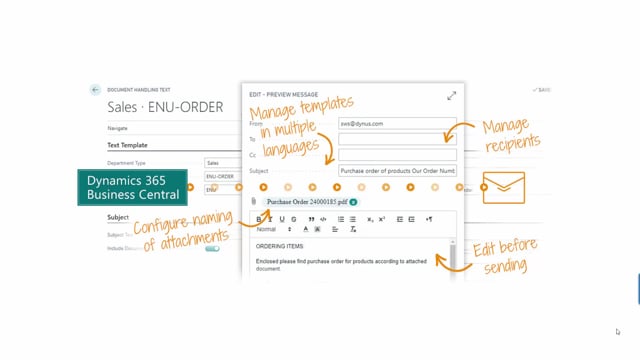
With document handling you send emails from your own email address, use the right language, and give the attachment an understandable name in the correct language. The solution supports multiple languages in email templates, including how the attachment is named. You can also edit the email before sending it and manage multiple recipients, including CC and BCC.
Why system-generated emails lose the recipient’s trust
Many emails sent automatically from a business system are not trusted. The reason is simple: they are not personalized and they are not understandable for the person receiving them. When an invoice arrives in a way that looks impersonal or unclear, it can easily be mistaken for a malicious email attachment.
That is bad on two fronts. It damages your brand, and it means you might not get paid because the recipient never opens the email or acts on it.
What makes an email trustworthy
A trusted email comes down to a few concrete details:
- Personalize the email so it speaks directly to the recipient.
- Send it from your own email address rather than a generic system address.
- Use the right language for the recipient.
- Name the attachment with an understandable name in the correct language.
When you get these things right, your email will be trusted, and your recipient is far more likely to read it and act on it.
Managing multiple languages in email templates
The main feature of document handling is the ability to manage multiple languages in your email templates. That includes configuring how the attachment is named, so the file name itself appears in the correct language for each recipient.
This means you do not have to settle for one generic template. You can match the language to the customer, both in the body of the email and in the attachment.
Editing emails and managing recipients before sending
In addition to email templates, document handling lets you edit the email before you send it. You are not locked into a fixed template if a specific situation calls for an adjustment.
You can also manage multiple recipients, including CC and BCC recipients, directly from Business Central.
A full-featured solution for sending documents from Business Central
Taken together, document handling gives you a full-featured solution for sending emails with documents attached straight from Business Central. You get personalized, multilingual emails sent from your own address, with clearly named attachments and full control over recipients.
Q&A
Why are system-generated emails often not trusted?
Because they are not personalized and not understandable for the recipient. An invoice that looks impersonal or unclear can be mistaken for a malicious attachment, which hurts your brand and delays payment.
What does document handling for Business Central do?
It lets you send personalized emails with documents attached directly from Business Central. You send from your own email address, use the right language, and name attachments understandably in the correct language.
Can document handling support multiple languages?
Yes. The main feature is managing multiple languages in email templates, including configuring how the attachment is named in the correct language.
Can I edit an email before sending it?
Yes. In addition to using email templates, you can edit the email before sending it.
Does document handling support multiple recipients?
Yes. You can manage multiple recipients, including CC and BCC recipients.