
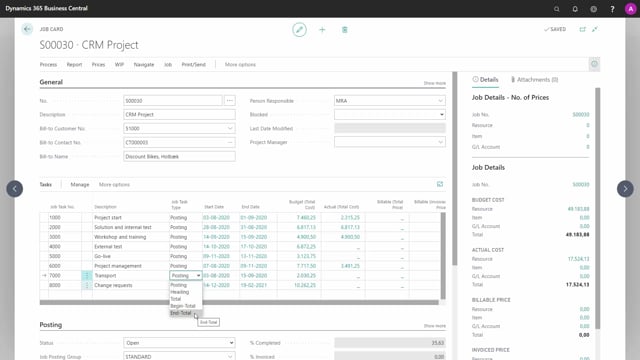


In Business Central project management, you divide each job into job tasks on the second level of the project hierarchy. Job tasks define the data structure for all transactions on the job, and they work much like a chart of accounts for the individual project.
Job task lines are mandatory. You cannot post entries to a job without at least one job task to refer to. Specifically, you need at least one job task of the type Posting before you can register any entries.
You decide how to structure the job tasks yourself. Beyond Posting lines, you can use heading, total, begin-total, and end-total types, just as you would in a chart of accounts. These extra types are mainly useful on more complex jobs.
Job tasks define the structure of a project in Business Central
On the second level of the project hierarchy, you split a job into multiple job tasks. Think of these as the phases of a project. They provide the data structure for all transactions on the job and act as a simple chart of accounts for each individual job.
The functionality for defining job tasks is similar to how you work with the chart of accounts. That means the structure and the available task types will feel familiar if you already know how the chart of accounts is built up.
Job task lines are mandatory for posting entries
Be aware that job task lines are required when you create a job. You cannot post entries on a job without at least one job task to refer to.
The job task you post against must be of the type Posting. Without at least one Posting line, there is nowhere to register the entries, so this is a hard requirement before you can start working with the job.
Choosing job task types and project structure
How you structure your job tasks is up to you. In a typical example, you might divide a job into eight job tasks laid out as a waterfall-based project method, but you are free to set them up however your project requires.
As with the chart of accounts, you can use different task types. Besides the Posting type, you can create:
- Headings
- Totals
- Begin-totals
- End-totals
These additional types are mainly used on more complex jobs where you want a clearer overview and subtotals. On simpler jobs you may not need them, but the option is there when you do.
Q&A
What is a job task in Business Central?
A job task sits on the second level of the project hierarchy and represents a phase of a project. It provides the data structure for all transactions on the job and works like a simple chart of accounts for that job.
Can you create a job without job task lines?
No. Job task lines are mandatory. You cannot post entries on a job without at least one job task to refer to.
Which job task type do you need in order to post entries?
You need at least one job task of the type Posting. Without a Posting line, there is nowhere to register entries on the job.
What job task types are available?
Similar to the chart of accounts, you can use Posting, headings, totals, begin-totals, and end-totals. The total and heading types are mainly used to structure more complex jobs.