
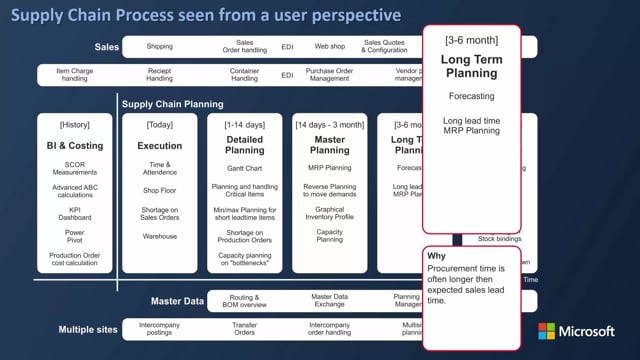


When you run long-term planning in Business Central, you need to set a starting date that sits after your existing production orders. If you plan within a period where you already have firm planned or released production orders, MRP will suggest changes to those orders and create noise for your master planners.
To find the right starting date, sort your production orders by due date in descending order. The latest due date tells you where your existing orders end. Start your planning horizon the day after that date.
You can view all production orders at once from the item card. Drill down on the quantity on production order, remove the item filter, and you will see released and firm planned orders together so you can identify the true end date.
Setting the planning horizon for long-term purchase planning
If you are a purchase planner working with long-term planning, you typically work with a planning horizon of 3 to 6 months, or sometimes 3 to 12 or even 18 months. Before you build the plan, you need to settle two dates: the starting date and the end date.
The end date is straightforward. It follows from your horizon. The harder question is the starting date. It is not simply three months ahead from today. It depends on where your existing production orders end.
Why you should not plan within periods that already have orders
The important thing is to avoid planning within a period where you already have existing orders. If your starting date falls inside that period, MRP planning may suggest changes to orders that are already firm planned or released. You do not want to touch those orders, because changing them creates noise for your master planners.
So the starting date for your plan has to fall after the last existing production order.
Finding the last production order in Business Central
One approach is to look at your firm planned production orders first, then your released production orders afterwards. On the firm planned production order list, you can filter and sort by due date in descending order. In this example, the last firm planned production order has a due date of the 30th of May. That means any new planning needs a starting date after that, otherwise MRP would suggest changing this order.
But firm planned orders are only part of the picture. You also have to account for released orders.
Viewing released and firm planned orders together from the item card
To look at both order types at the same time, go into the item card and drill down on the quantity on production order. Then remove the filter on item. You now see all production orders across the board. Sort by due date in descending order, and you get a mixed view of released and firm planned production orders.
In this example, the end date is again the 30th of May. With that confirmed, you plan from the 1st of June and run six or eight months ahead from there. That period becomes the horizon you enter in the planning worksheet.
Q&A
How do I find the starting date for long-term planning in Business Central?
Sort your production orders by due date in descending order to find the latest due date among your existing orders. Set your planning starting date for the day after that date so your new plan begins where the existing orders end.
How can I see both released and firm planned production orders at once?
Open the item card, drill down on the quantity on production order, and remove the filter on item. You then see all production orders together. Sort by due date in descending order to identify the true end date across both order types.
Why should I not start planning within a period that already has production orders?
If your starting date falls inside a period with existing firm planned or released production orders, MRP will suggest changes to those orders. That creates noise for your master planners, which is why you set the starting date after the last existing order.