


If you need detailed capacity planning or bottleneck planning in Business Central, the standard master planning process does not give you everything out of the box. The good news is that the data you need is already in the system. You just need the right tool to extract and visualise it.
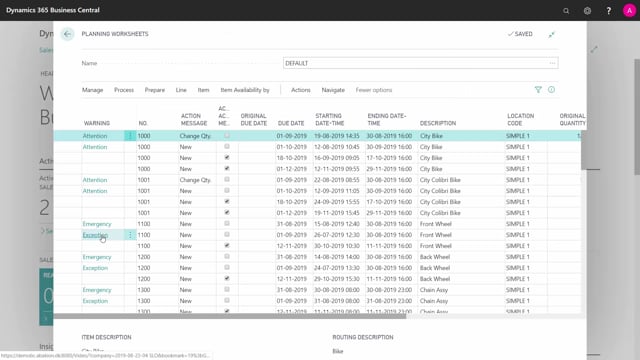
The relevant data sits in the capacity need entries. From the planning worksheet, you can navigate from a planning line into its routing, and from the routing into the allocated capacity entries. This table holds both the capacity need from your planning lines and the allocated capacity for firm planned, planned, and released production orders.
To turn this data into useful capacity planning, you can use an external tool or app. Abakion has built apps directly into Business Central for this. You can also use Power BI or other BI tools to extract the data and build capacity overviews.
With this data extracted, you can display capacity in the various Gantt charts available on the market, or use it for bottleneck planning. A bottleneck planning app inside Business Central lets you stretch out the capacities so all your production orders line up nicely, without exceeding whatever allocated capacity percentage you want to allow.
Where to find capacity data in Business Central
The starting point is the planning worksheet. Once you have run a plan, take one of the lines and navigate into the routing for that line. From the routing, navigate further into the allocated capacity entries.
This single table contains the capacity need from your planning lines, based on your setup, alongside the allocated capacity for firm planned, planned, and released production orders. That combination is what makes the data valuable for planning purposes.
Tools for detailed capacity and bottleneck planning
Business Central does not deliver detailed capacity planning or bottleneck planning as a complete standard feature. To get there, you have a few options:
- Use an app built into Business Central, such as the bottleneck planning apps from Abakion.
- Extract the data with Power BI or another BI tool and build your own capacity overviews.
- Feed the data into a Gantt chart tool to visualise capacity over time.
A bottleneck planning app in Business Central can take the capacity entries and stretch out the capacities, so your production orders are scheduled in a sequence that never exceeds the allocated capacity limit you set. That keeps your load realistic instead of overbooking a work centre.
What to do if you need this functionality
If detailed capacity planning or bottleneck planning is part of your master planning needs, plan to add an external tool or app rather than relying on the standard process alone. The data is already there in the capacity need and allocated capacity entries. The work is in choosing how to extract and present it in a way that fits how you run your production.
Q&A
Where do I find capacity data for planning in Business Central?
Go to the planning worksheet and run a plan. Take one of the planning lines, navigate into its routing, and from there navigate into the allocated capacity entries. This table holds both the capacity need and the allocated capacity for firm planned, planned, and released production orders.
Does Business Central support detailed capacity and bottleneck planning out of the box?
Not fully. The standard master planning process does not cover detailed capacity planning or bottleneck planning. You should use an app, Power BI, or another BI tool to extract the data and build the planning you need.
How does a bottleneck planning app help?
A bottleneck planning app in Business Central stretches out the capacities so your production orders are lined up in sequence and never exceed the allocated capacity percentage you choose. This prevents overloading your work centres.
Can I use Power BI for capacity planning in Business Central?
Yes. You can use Power BI or other BI tools to extract the capacity need and allocated capacity entries and build capacity overviews from that data.