
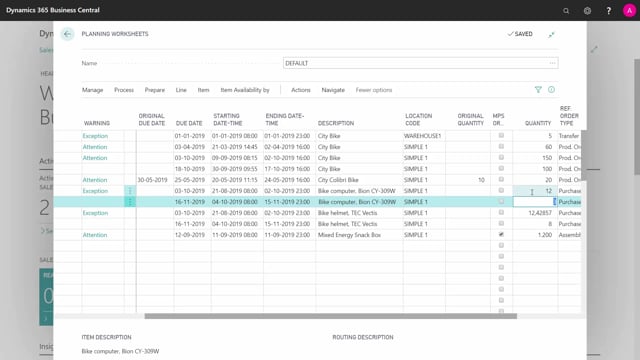


MRP planning in your planning worksheet works by breaking down demand from the top-level item through all the lower levels of your product hierarchy. The system creates planning component lines under each manufactured item, so the demand from one level flows down to the next.
You can use low-level codes to plan one level at a time instead of running the whole plan in one go. This gives you a chance to review and adjust the planning lines before the next level is calculated.
When you change a line on level zero, the system takes those changes into account when it calculates the next level down. Your manual adjustments carry through the hierarchy.
Avoid planning a level that mixes only purchase items or only production items in a way that breaks the hierarchy logic. Plan level by level so the system can break down demand correctly from the top all the way down.
How MRP planning breaks down demand through the hierarchy
The whole idea behind MRP planning is to take the demand at the top-level item and break it down into all the lower levels. That is exactly the information you need when you sit down to plan in your planning worksheet.
For each line the system calculates, it looks at what the line requires. If it is a manufactured item, the system creates planning component lines underneath that specific line. These lines say: if this planning line is supposed to be made, we need all these components, in the expected quantities, with their due dates. That is your broken-down demand.
If you run the complete plan in one go, the system breaks down the whole hierarchy and creates demands on all the levels below. It works through everything from the top down automatically.
Using low-level codes to plan one level at a time
You do not have to plan everything at once. You can take a more manual approach by adding a low-level code on the top-level item. That way you only plan the low-level code items, which can be purchase items, transfer items, production items, and so on.
This is what you might call low-level code planning. You take one level at a time. You could, for example, plan level zero first, then handle level one, then take level two and the rest of them. By doing it this way, you plan in different levels and keep control of each step.
One thing to keep in mind: it does not make sense to plan with only production items or only purchase items isolated from the rest. The point is to let the system break down the full demand through the proper hierarchy.
Adjusting planning lines before moving to the next level
Planning one level at a time gives you the chance to step in and adjust before the system calculates the next level. You can change individual lines. For instance, you might decide not to change a particular quantity for whatever reason, or you might see quantities you do not like and adjust them.
It pays to look closely at the quantities and check what you are doing, so you are not doing anything that does not make sense or that the math would not consider sensible.
When you then calculate the next level, the system knows about the changes you made and takes everything from the level above into account. So your adjustments on level zero feed correctly into level one, and on down through the rest of the hierarchy.
Q&A
What is the purpose of MRP planning in the planning worksheet?
The purpose is to break down demand from the top-level item into all the lower levels of the product hierarchy. This gives you the information you need to plan purchase, transfer, and production items at every level.
How does the system create demand for components on manufactured items?
When the system calculates a line for a manufactured item, it creates planning component lines underneath it. Those lines list the required components with their expected quantities and due dates, based on what is needed to make the planning line.
What is low-level code planning?
Low-level code planning means you plan one level at a time instead of running the full plan in one go. You add a low-level code on the top-level item, plan that level, then move on to the next level, and so on through the hierarchy.
Do changes I make on one level carry over to the next level?
Yes. When you calculate the next level down, the system knows about the changes you made on the level above and takes them into account. Your manual adjustments flow through the rest of the hierarchy.
Can I plan with only purchase items or only production items?
No, that does not make sense in isolation. The purpose of the plan is to break down the full demand through the hierarchy, so you should plan level by level rather than restricting it to a single item type.