
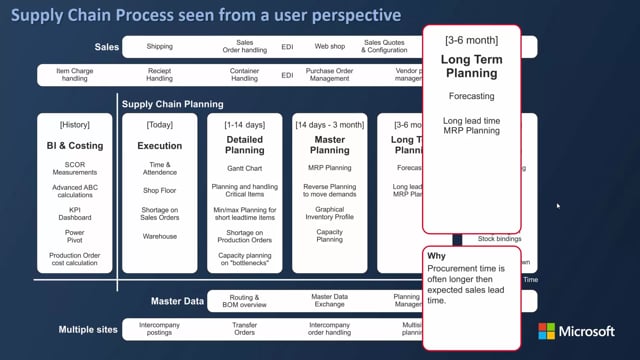


If you run long-term material planning in Business Central, the starting date you give the MRP batch job determines whether you get a clean plan or a mess of reschedule and change-quantity actions. Set the starting date to the point in time where your firm planned and released production orders end. If you set it too early, the planning worksheet starts interfering with orders you have already committed to.
A typical pattern is to set the starting date to the first day after your firm planning horizon. For example, if your firm planned and released orders run until the end of May, set the MRP starting date to 1 June. Everything from that date onward gets planned as new supply with action type New, because it sits in the long-term period.
You can also choose to break the planning into two runs. First plan production orders only, then run the plan again for purchase items. This lets you review and adjust the production orders before generating purchase supply.
Using the MRP batch job for long-term purchase planning
As a long-term planner, often a purchaser, you can use the MRP batch job to break down your requirements from a sales forecast. The sales forecast is the long-term demand. With the forecast in place, you open the planning worksheet and calculate the plan.
The key input is the starting date. It needs to be set precisely, because it defines where the long-term planning begins relative to the orders you have already committed to.
Why the starting date matters
Say today is the middle of March 2019. If you plan from 1 January to 31 December and only plan production orders, you end up with a lot of change-quantity lines, reschedule actions, and similar noise. That happens because the starting date falls inside the period where you already have existing orders. The plan tries to adjust orders you have already firmed up, which is not what you want.
The fix is to move the starting date forward to the end of your firm planning horizon. If your firm planned and released production orders run until the end of May, set the starting date to 1 June. From that point onward, the plan generates fresh supply rather than fighting with existing orders.
Planning production orders first
In this example you plan production orders only, so you can see how the breakdown works. The MRP calculation breaks down the hierarchy and creates demand on the production order, which then drives your purchase supply.
The result is a set of orders that all carry action type New, because they fall in the long-term period beyond your firm horizon. The quantities are modest at this stage, since purchase orders have not yet been planned.
If you need to, you can change a specific order in the worksheet, navigate into its components, and adjust them before moving on. This gives you the base for your long-term purchase planning.
Adding purchase planning
Once the production orders are in place, you can calculate the plan again for the same period, this time for purchase items. The calculation generates purchase orders in the long term.
You could also do both production and purchase planning in one go. In practice, though, it often works better to carry out the action messages for the production order lines first, turning them into planned production orders, and then do the purchase planning afterwards.
Q&A
What starting date should I use for the MRP batch job in long-term planning?
Set the starting date to the first day after your firm planned and released production orders end. For example, if your firm horizon runs until the end of May, use 1 June. This keeps the plan from interfering with orders you have already committed to.
Why am I getting lots of reschedule and change-quantity actions in the planning worksheet?
The starting date is set too early and falls inside the period where you already have existing orders. The plan then tries to adjust those committed orders. Move the starting date forward to the end of your firm planning horizon to fix it.
Should I plan production orders and purchase orders together or separately?
You can do both in one MRP run, but in practice it often works better to plan production orders first, carry out the action messages to create planned production orders, and then run the purchase planning. This lets you review and adjust the production orders before generating purchase supply.
What action type do long-term planned orders get?
They get action type New, because they sit in the long-term period beyond your firm planning horizon rather than adjusting existing orders.