
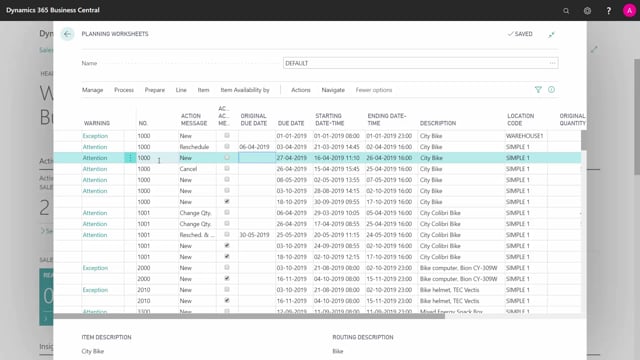


If you work as a planner in Microsoft Dynamics 365 Business Central, you need to understand that planning and reordering are two completely separate steps in the planning worksheet. The system runs both, but always in sequence: first it plans, then it reorders.
The planning calculation determines what you need and when. The reordering step then figures out how to supply it, based on the replenishment system set on each item.
The replenishment system on the item controls what kind of order line the worksheet creates. A purchase item generates a purchase proposal, a production item generates a production order with components, an assembly item generates an assembly order, and a transfer item generates a transfer order.
Planning and reordering are two separate steps in the planning worksheet
It is easy to think of the planning worksheet as one single action, but it really does two things in order. The first step is planning. The second step is reordering. Both happen in the worksheet, but the system never does them at the same time. It always finishes the planning before it moves on to reordering.
Take an example. Say you have a line for item 1000. The system plans this item per item, per location and per variant, using all the relevant input. Based on that calculation, it suggests creating a new line with a due date of 27 April and a quantity of 55.
How the planning calculation works
Think of the planning engine as a machine that calculates all the planning first. It looks at demand, supply, inventory, master data and dependent demand, and from that it works out which line you actually need to act on. In the example, the result is the line for 55 units with a due date of 27 April.
At this stage the system has only decided what to do. It has not yet decided how to fulfil it.
How the reordering step creates the order line
Once the planning is done and the line is established, the reordering step takes over. Now the system looks at the replenishment system set on the item to decide what type of order to create.
- Purchase item: the worksheet creates a purchase proposal and adds the new components on the line.
- Production item: the worksheet creates a production order, sets the starting date and adds the components.
- Assembly item: the worksheet creates an assembly order.
- Transfer item: the worksheet creates a transfer order.
The starting date is calculated as part of this step. If the line is backwards planned, the system works back from the due date to determine when the order needs to start.
Why the sequence matters for planners
Keeping the two steps apart helps you read the results in the worksheet correctly. The quantity and due date come from the planning calculation. The order type, the starting date and the components come from the reordering step, driven by the item’s replenishment system. If something looks wrong on the suggested line, knowing which step produced it tells you where to look.
Q&A
What is the difference between planning and reordering in the planning worksheet?
Planning calculates what you need and when, based on demand, supply, inventory, master data and dependent demand. Reordering then creates the actual order line and decides how to fulfil the need. Both run in the planning worksheet, but always in that order: planning first, then reordering.
What decides whether the worksheet creates a purchase, production, assembly or transfer order?
The replenishment system set on the item decides the order type. A purchase item gives a purchase proposal, a production item gives a production order with components, an assembly item gives an assembly order, and a transfer item gives a transfer order.
How is the starting date on a planning line calculated?
The starting date is set during the reordering step. If the line is backwards planned, the system works back from the due date to find when the order needs to start.