
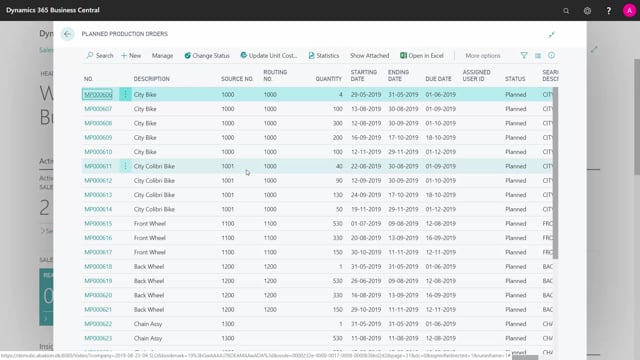


If you handle long-term requirements planning in Microsoft Dynamics 365 Business Central, you can use planned production orders to create demand for your purchasers. This lets you maintain requirements far into the future without disturbing the day-to-day work in the production department.
Master planners and detailed planners often avoid planned production orders because the orders get deleted when you run MRP. By keeping a list of planned production orders specifically for purchasing, you can define and break down future demand without that being a problem.
When you run your MRP planning, set the interval to start beyond your firm planned and released production orders and end at your furthest lead time for purchase items. Filter on purchase to get suggestions for the purchase lines you need long term. You can then filter on each vendor and create one purchase order at a time, which makes it easy to set up a frame agreement with that vendor.
Use planned production orders to create long-term demand
When you do long-term requirements planning in Business Central, planned production orders are a good way to create demand for your purchasers. The challenge is that master planners and detailed planners in production usually don’t use them, because the planned production orders get deleted again every time you run the MRP.
That makes planned production orders a useful tool for the purchaser instead. With a list of planned production orders, you can define demand or break down demand far into the future, without it affecting the normal work in the production department.
If you open a planned production order line, you can see the component, and you can see how it has been broken down by the MRP batch job. This way you can maintain requirements well ahead of time as a dedicated activity for purchasing.
How to set up the MRP interval for long-term purchasing
When you create your MRP planning for this purpose, set the interval carefully:
- Set a starting date on the other side of your firm planned and released production orders, so you don’t interfere with the short-term plan.
- Set the ending date as far ahead as your furthest lead time for purchase items.
- Filter on purchase, since you already have all the planned production orders in place.
This generates suggestions for the purchase lines you need from a long-term perspective.
Filter by vendor and create frame agreements
Once you have the planning suggestions, you can filter on vendors and handle them one at a time, or look at all your vendors together to see whether the picture makes sense. Find the vendor number in the column, filter on it, and create one purchase order at a time. From there you can set up a frame agreement with that vendor.
Q&A
Why do production planners avoid using planned production orders in Business Central?
Because the planned production orders get deleted again when you run the MRP. For that reason they are better suited as a tool for purchasers, who can use them to maintain future demand.
How should I set the MRP planning interval for long-term purchasing?
Set the starting date beyond your firm planned and released production orders, and set the ending date as far ahead as your furthest lead time for purchase items. Then filter on purchase, since the planned orders are already in place.
How can I turn long-term purchase suggestions into orders?
Filter the suggestions on the vendor number column and create one purchase order at a time. This makes it straightforward to set up a frame agreement with each vendor.