
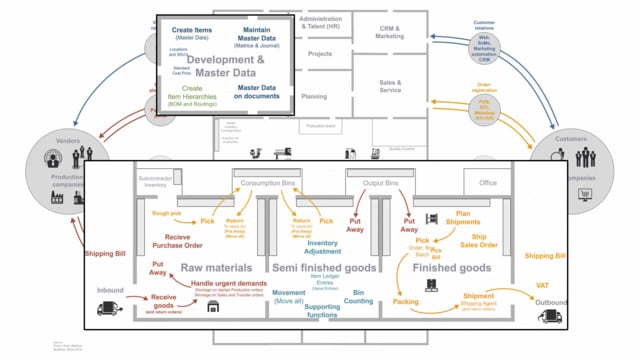


Business Central is an ERP system, and understanding the basics starts with knowing what an ERP system actually does. This article walks through the core areas of Business Central and the order in which most companies put them into use. You start with finance, which is the backbone of the system, then add sales and purchases, and finally introduce inventory management when you need to track quantities.
The finance module feeds the G/L Entry table, which is the spine of the system. Sales and purchases let you trade directly on G/L accounts or resources without an inventory. When you start tracking quantity, the Item Ledger Entry becomes the second spine of the system and lets you control inventory levels and values.
What an ERP system is
The complete supply chain in an ERP system can be complex to understand. Even if you don’t plan to use all of those processes, it’s worth knowing that an ERP system covers a very wide range. A full ERP implementation includes a lot of advanced functionality, where some processes are very basic and others are far more advanced.
The point is that you don’t have to use everything. Business Central scales from the basics up to highly complex supply chain processes, and you can adopt the parts that match where your company is right now.
Finance is the core of Business Central
Originally, an ERP system focused on money, meaning the finances along with sales and purchases. Back then it was called a financial system, because the focus was based on money.
In Business Central, the finance department and all its processes form the core of the system. Everything posts into the G/L Entry table, which is the spine of the system. Every company needs the finance module, so this is where you start.
Sales and purchases without inventory
After finance, sales and purchases are the first areas most companies take into use. You can sell and purchase directly on G/L accounts or on resources without actually having an inventory.
This is the next level of development. It lets you handle the buying and selling side of your business before you commit to managing physical stock.
Adding inventory and item management
Once you want to focus on quantity, you bring inventory into your company. This introduces the second spine of the ERP system, the Item Ledger Entry.
You start by creating items and the data on those items, so you can sell them, buy them, and manage them on your inventory. From there you can control your inventory levels and inventory values, and keep an inventory that reflects your reality.
These are the basic areas of the Business Central system: finance first, then sales and purchases, and then inventory. Together they give you a solid foundation before you move on to the more advanced processes.
Q&A
What is the core of Business Central as an ERP system?
The finance department and its processes are the core. Everything posts into the G/L Entry table, which is the spine of the system, and every company needs the finance module.
In what order should you adopt the modules in Business Central?
Start with finance, then add sales and purchases, and finally introduce inventory management when you need to track quantities.
Can you sell and purchase in Business Central without an inventory?
Yes. You can sell and purchase directly on G/L accounts or resources without having an inventory at all.
What is the Item Ledger Entry in Business Central?
The Item Ledger Entry is the second spine of the ERP system. It lets you manage items on your inventory and control your inventory levels and values.
What are the basic areas of Business Central?
The basic areas are finance, sales and purchases, and inventory with item management. These form the foundation before you move on to more advanced supply chain processes.