
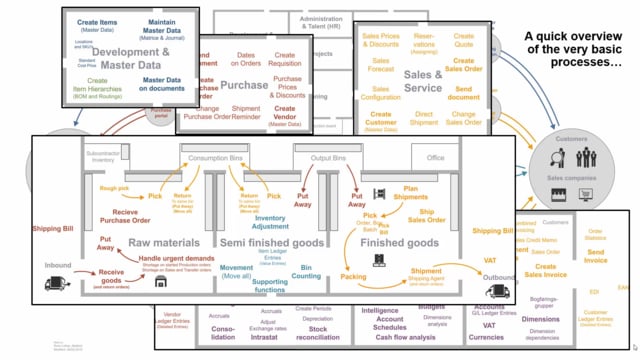


Business Central handles the standard ERP processes that almost every company needs, but it also covers a set of more advanced modules. If you run projects, manufacture goods, deliver services, or need to plan supply across your supply chain, Business Central has dedicated functionality for each of these areas.
The project module lets you collect purchases, sales, inventory, and finance entries under a single project number so you can follow gross profit and performance per project. The manufacturing module turns purchased or semi-finished items into finished goods through production orders. The service module maintains the full history of the items you have sold and service on. The planning module converts demand into production orders, purchase orders, and transfer orders across the whole supply chain.
The basic ERP processes in Business Central
Almost all companies want the same core processes from their ERP system, and Business Central covers them as standard. These are finance, sales, purchases, setting up items, and controlling your inventory. This is the foundation that most businesses operate on day to day.
On top of this foundation, Business Central offers a number of more advanced modules for companies that need them.
Project management in Business Central
You can handle projects in Business Central that run across purchase, sales, inventory, and finance. You create a project and add the project number to all the different documents involved.
This lets you gather every entry under the same project so you can see the gross profit and the performance on a specific project number. Instead of tracking costs and revenue in separate places, you get one consolidated view per project.
Manufacturing and production orders
The manufacturing module takes purchased items or semi-finished items and adds them into production orders to add value. The output becomes new items that you can put on stock or sell.
This way you can work with a more complex level of inventory. You purchase only raw materials and produce all the way up to the finished goods you want to sell.
The service module for sold goods
The service module is another of the more complex parts of Business Central. You can create service orders and service items.
From a sales perspective, you maintain all the information on goods you have sold and provide services on. You can keep the full history on those services, including which raw materials or items you added to the service item and which resources you used. This functionality is part of the sales side of the system.
Supply planning across the supply chain
The planning functionality plans items and demands into production orders, purchase orders, or transfer orders. It is complex functionality built to handle supply planning all through your supply chain.
Instead of deciding manually whether to produce, purchase, or transfer to cover demand, the planning module helps you turn that demand into the right supply orders.
Q&A
What are the basic processes in Business Central?
The basic processes are finance, sales, purchases, setting up items, and controlling inventory. These are the core processes almost all companies want from an ERP system.
How does project management work in Business Central?
You create a project and add its project number to documents across purchase, sales, inventory, and finance. Business Central then gathers all entries under that project number so you can see gross profit and performance per project.
What does the manufacturing module do?
It takes purchased or semi-finished items and adds them into production orders to add value. The result is finished goods you can put on stock or sell, so you can purchase only raw materials and produce up to the finished products you sell.
What is the service module used for?
The service module lets you create service orders and service items so you can maintain information on goods you have sold and provide services on. You can keep the history of which items and resources you used for each service. It is part of the sales functionality.
What does the planning functionality cover?
The planning functionality converts demand into production orders, purchase orders, or transfer orders. It is built for supply planning across the entire supply chain.