
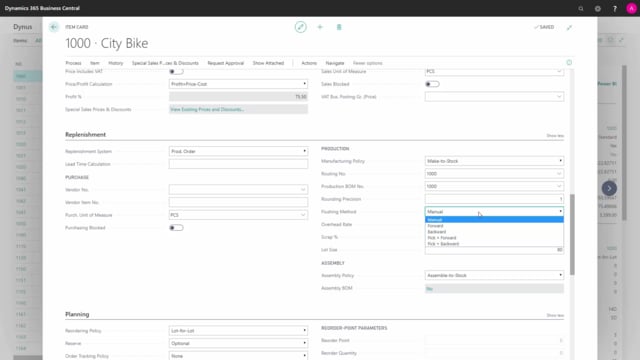


If you produce items in Business Central, the fields on the Replenishment tab of the item card control how production orders are created, costed, and consumed. This article explains what each field does and which settings most companies use in practice.
Set the Replenishment System to Prod. Order to make the production fields active. The fields only apply when this system is chosen.
Use the Manufacturing Policy field to choose between Make-to-Stock and Make-to-Order. Most companies use Make-to-Stock, where you produce the item and put it on stock. Make-to-Order links the production order directly to a sales order, and the source becomes the sales order number instead of the item number.
Choose the Flushing Method to control when components are consumed. Manual flushing through a consumption journal gives the most accurate inventory. Forward flushes automatically when you release the order, and Backward flushes automatically when you finish the order based on actual output.
Use the Standard Cost calculation fields, Overhead Rate, Scrap %, and Lot Size, to influence the calculated cost price of the item. Lot Size matters because setup time is split across the lot size quantity when the standard cost is calculated.
Production fields live on the Replenishment tab
On the item card in Business Central, there are several fields relevant for the production department. They are spread across two tabs, and it helps to know which is which.
The Planning tab also contains fields that production people often use, but those are planning parameters. The actual production functionality, the one that drives the creation of production orders, lives on the Replenishment tab. All the fields described here apply when you set the Replenishment System to Prod. Order.
Manufacturing Policy: Make-to-Stock versus Make-to-Order
The Manufacturing Policy field decides how the production order relates to demand.
Almost all our clients use Make-to-Stock. You produce the item and put it on stock, and the source on the production order is the item number.
With Make-to-Order, the production order is tied directly to the sales order. The source becomes the sales order number instead of the item number. Make-to-Order also lets you have more than one production order line on each production order. In practice, most customers prefer one item per production order, which keeps things simple.
Routing and Production BOM define how the item is made
Two setups describe how an item is produced.
The Routing describes the way you process the item: the operations, work centers, and machine centers you need. The Production BOM is the list of ingredients, all the components you need to produce the item. To use a kitchen analogy, the routing is the recipe steps and the production BOM is the ingredients.
Both are separate setups, so you can reuse the same routing or the same production BOM across several items. In the standard demo data, for example, many of the top-level bikes share the same production BOM number and the same routing number.
Rounding Precision and Flushing Method
The Rounding Precision field is used in the production department when suggesting output of the item.
The Flushing Method controls how the item is consumed for the production order:
- Manual: You flush the item yourself from a consumption journal. This gives the most precise inventory, because you register actual consumption.
- Forward: The item is flushed automatically from a consumption journal when you release the production order.
- Backward: The item is flushed automatically when you finish the production order, based on the actual output.
Overhead Rate and Scrap % affect the standard cost
The Overhead Rate is a fixed amount added on top of the item’s standard cost when you calculate the standard cost price. It is normally meant to cover indirect costs in the production area, such as maintenance of the machinery and overhead costs specifically related to producing the item.
The Scrap % can be set up to reflect that you expect to scrap some units when producing the item. It affects the standard cost calculation and makes the expected consumption amount on the production order higher.
Lot Size and its effect on cost calculation
The Lot Size should display the normal quantity you produce the item in. It is relevant for calculating the standard cost price, because the setup time on the routing is split across the lot size quantity. A larger lot size spreads the setup time over more units and lowers the calculated cost per unit.
Q&A
Which Business Central tab holds the fields for creating production orders?
The Replenishment tab on the item card. The fields apply when you set the Replenishment System to Prod. Order. The Planning tab also has fields production people use, but those are planning parameters.
What is the difference between Make-to-Stock and Make-to-Order?
With Make-to-Stock you produce the item and put it on stock, and the source on the production order is the item number. With Make-to-Order the production order is linked directly to a sales order, and the source becomes the sales order number. Make-to-Order also allows more than one production order line per order.
Which flushing method gives the most accurate inventory?
Manual flushing. You register the actual consumption yourself from a consumption journal, which gives the most precise inventory. Forward flushes automatically when you release the order, and Backward flushes automatically when you finish the order based on actual output.
What is the Overhead Rate used for?
It is a fixed amount added on top of the item’s standard cost when calculating the standard cost price. It typically covers indirect production costs, such as machinery maintenance and overhead related to producing the item.
Why does Lot Size matter for the standard cost?
The setup time on the routing is split across the lot size quantity when the standard cost is calculated. A larger lot size spreads setup time over more units, lowering the calculated cost per unit.