
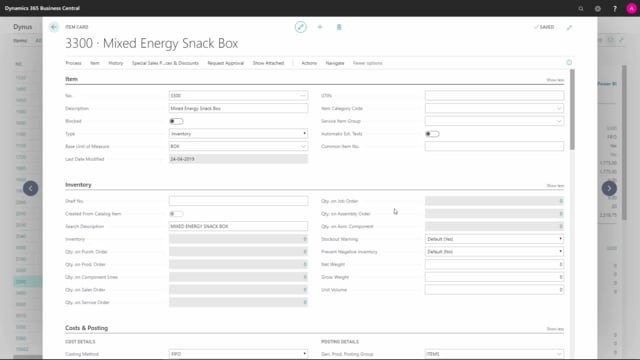


The item card in Business Central contains a wide range of fields, and several of them matter specifically to the people working in the warehouse. This article walks through the basic warehouse-related fields on the item card so you know where to find them and what they do.
You set the global trade item number (GTIN) on the Item tab to give the item an international identifier with a defined structure. If you handle the item in several units of measure, register the GTIN as a bar code per unit of measure in the cross reference table.
You use the Shelf No. field on the Inventory tab only when you don’t work with bin codes. You enter net weight, gross weight, and unit volume on the same tab, and the warehouse uses these for handling and shipping.
You handle assembly items through the Assembly Policy and assembly BOM on the Replenishment tab, which lets the warehouse pick components directly into the shipping box without involving production.
You control lot and serial number tracking through the item tracking code on the Item Tracking tab, where you also set number series and expiration date calculation formulas.
GTIN and bar codes on the Item tab
On the Item tab you find the Global Trade Item Number, usually called the GTIN. The GTIN is the global identifier for the item, and it follows a specific structure defined by an international standard. You enter that number directly on the item card.
If you handle the same item in different units of measure, you should register the GTIN as a bar code for each unit of measure. You do this in the cross reference table, where you set up the bar code per base unit of measure.
Shelf number, weight, and volume on the Inventory tab
The Inventory tab holds the Shelf No. field. You normally only use this if you do not work with bin codes in the warehouse. It is a fixed shelf number that you enter as a plain text field.
On the right-hand side of the Inventory tab you can enter the net weight, the gross weight, and the unit volume for the item. These fields are typically relevant for the warehouse, for example when calculating shipments.
Assembly items on the Replenishment tab
If the item is an assembly item, the Assembly Policy and the assembly BOM on the Replenishment tab are relevant to the warehouse as well. Assembly items are normally handled without production, which means the warehouse people pick the components directly into the box or shipping box.
On this tab you define whether the item is assemble-to-stock or assemble-to-order, and you can drill into the assembly BOM to see the items it contains.
Item tracking on the Item Tracking tab
On the Item Tracking tab you define the item tracking code, which applies when the item needs to be traced. This covers items handled by lot number and items handled by serial number.
You can set up number series for the lot numbers and serial numbers here. If the item is handled by expiration date, you also define the expiration date calculation formula on this tab.
Q&A
What is the GTIN field on the Business Central item card used for?
The Global Trade Item Number (GTIN) gives the item an international identifier with a structure defined by an international standard. You enter it on the Item tab, and if you use several units of measure, you register the GTIN as a bar code per unit of measure in the cross reference table.
When should you use the Shelf No. field?
You normally use the Shelf No. field only when you do not work with bin codes in the warehouse. It is a fixed shelf number that you enter as a plain text field on the Inventory tab.
Why are assembly fields relevant to the warehouse?
Assembly items are usually handled without production, so the warehouse people pick the components directly into the shipping box. The Assembly Policy and assembly BOM on the Replenishment tab control this, and you can choose between assemble-to-stock and assemble-to-order.
Where do you set up lot and serial number tracking for an item?
You set up tracking on the Item Tracking tab by defining the item tracking code. There you can also set up number series for lot and serial numbers and add an expiration date calculation formula if the item is handled by expiration date.