
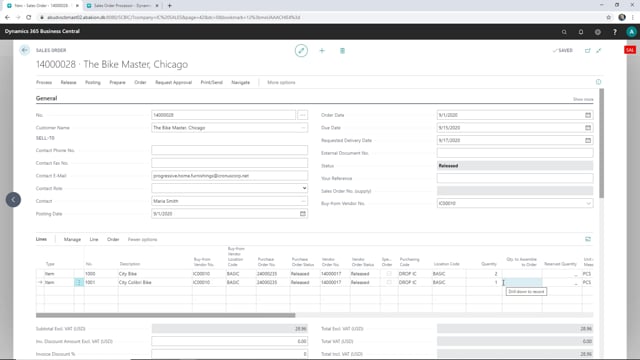


In Microsoft Dynamics 365 Business Central, you can set up intercompany so the supply company is allowed to change the quantity on a sales order. The change is sent back automatically to the corresponding sales order in the sales company.
You control this permission on the intercompany partner card in the supply company. If you have not enabled it, the supply company cannot change quantities on the intercompany order.
To make the change, reopen the sales order in the supply company, edit the quantity on the line, and release the order again. The updated quantity then appears on the sales order in the sales company when you refresh the page.
Controlling quantity changes between intercompany partners
When you work with intercompany in Business Central, the sales company and the supply company exchange orders automatically. One of the questions that comes up is whether the supply company should be allowed to adjust quantities on the orders it receives.
You decide this on the intercompany partner setup in the supply company. There you can enable or disable whether the supply company is allowed to change a quantity on a sales order. This keeps control in your hands, so you can either lock down the quantities or give the supply side the flexibility to adjust them.
How to change a quantity on an intercompany sales order
If the setting is enabled, the process in the supply company is straightforward:
- Reopen the sales order in the supply company.
- Change the quantity on the relevant line.
- Release the order again.
When you release the order, the changed quantity is sent to the sales order in the sales company. Go back to the sales order in the sales company and update the page, and you will see the new quantity reflected there.
Where the permission is controlled
Keep in mind that the whole thing hinges on the intercompany partner setup in the supply company. If you want to allow quantity changes, that is where you enable it. If you want to prevent the supply company from altering quantities, you leave the setting off.
Q&A
Can the supply company change the quantity on an intercompany sales order in Business Central?
Yes, but only if it is allowed. You enable this on the intercompany partner setup in the supply company. When the setting is on, the supply company can reopen the order, change the quantity on a line, and release it again.
Where do you control whether quantity changes are allowed?
You control it on the intercompany partner in the supply company. This setting determines whether the supply company is permitted to change a quantity on a sales order.
How does the sales company see the updated quantity?
Once the supply company releases the order with the new quantity, the change is sent to the sales order in the sales company. Open that sales order and refresh the page to see the updated quantity.