


intercompany/”>Intercompany trade in Microsoft Dynamics 365 Business Central lets you connect a supply company and a sales company so that documents flow automatically between them. When a drop-ship sales order is shipped and invoiced in the supply company, Business Central automatically creates a matching purchase invoice in the sales company. You then release and post that purchase invoice to complete the trade.
The purchase invoice is linked to the purchase order generated from the drop-ship order, so you do not enter the figures manually. You receive the goods on the purchase order, then post the purchase invoice that arrives from the supply company’s sales invoice.
To complete the flow on a received but not yet invoiced purchase order, open the order, use Process and Show Purchase Invoice, release the invoice, and post it. The purchase order is then marked as invoiced and the intercompany flow is complete.
How the intercompany document flow works between supply and sales company
When a sales order is shipped and invoiced in the supply company, Business Central creates a purchase invoice in the sales company. This purchase invoice is linked to the purchase order that was created from the drop-ship order in the sales company.
This linking is what makes the flow work without manual data entry. The documents are connected across the two companies, so the purchase invoice in the sales company reflects the sales invoice posted in the supply company.
Completing a received drop-ship purchase order in the sales company
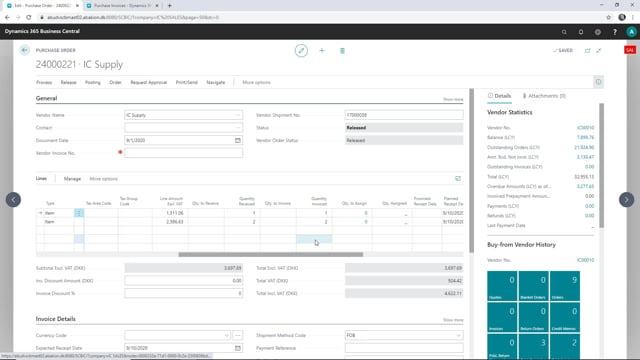
Consider a purchase order in the sales company that was created from a drop-ship order. The goods have been received, but the order has not yet been invoiced. To finish the process, follow these steps:
- On the purchase order, click Process and then Show Purchase Invoice. This opens the purchase invoice that was created from the sales invoice in the supply company.
- Release the invoice. You need to release it before you can post it.
- Post the invoice.
Once the invoice is posted, the purchase order is marked as invoiced as well, and the intercompany flow is complete.
Q&A
What happens when a drop-ship sales order is shipped and invoiced in the supply company?
Business Central creates a purchase invoice in the sales company. This purchase invoice is linked to the purchase order that was created from the drop-ship order in the sales company.
How do I find the purchase invoice created from the intercompany flow?
Open the purchase order in the sales company, click Process, and then Show Purchase Invoice. This displays the purchase invoice that was created from the sales invoice in the supply company.
Do I need to release the purchase invoice before posting it?
Yes. You first release the invoice and then post it. After posting, the linked purchase order is marked as invoiced and the flow is complete.