
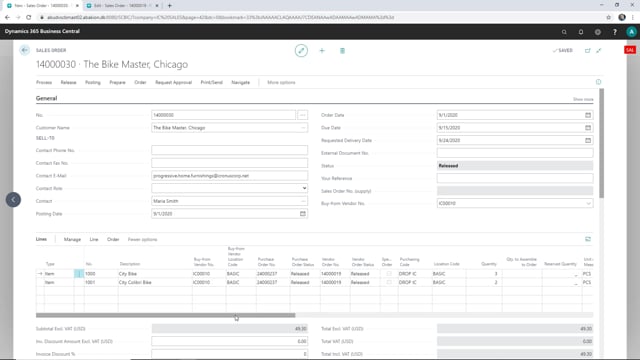


When you run an intercompany setup in Microsoft Dynamics 365 Business Central, a partial shipment in your supply company automatically updates the matching sales order in your sales company. You ship only the items that are ready, post the shipment, and the quantities shipped flow back to the original sales order without any manual re-entry.
You enter the quantity to ship on each line in the supply company, then post the shipment. The lines that still have outstanding quantities remain open for a later shipment.
The sales order in the sales company reflects the shipped quantities once you refresh the view. You do not need to register the shipment twice.
Partial shipments in an intercompany sales order setup
In an intercompany scenario in Business Central, a sales order in the sales company creates a corresponding sales order in the supply company. This lets the supply company handle the actual fulfilment while the sales company keeps the original customer order.
The example here starts in the supply company with a sales order that was generated from a sales order in the sales company. The task is to ship the goods, but only the items that are physically ready.
Shipping only the items that are ready
You do not have to wait until everything is available to post a shipment. On the sales order in the supply company, you enter the quantity to ship on each line and leave the rest. In this example, both items get a partial quantity, and the shipment is posted.
After posting, both items show a shipped quantity, while two units remain outstanding and stay open on the order. You can ship the rest in a later shipment when the items become available.
Shipped quantities update the sales company automatically
The value of this setup shows when you go back to the sales order in the sales company. After a quick refresh of the view, the lines there show the same shipped quantities. The shipment registered in the supply company is reflected on the original sales order without any duplicate posting.
This keeps both companies in sync. The supply company controls the physical shipment, and the sales company always sees the current status of what has been shipped and what is still outstanding.
Q&A
Can I do a partial shipment on an intercompany sales order in Business Central?
Yes. You enter the quantity to ship on each line in the supply company and post. The lines with remaining quantities stay open so you can ship them later when the items are ready.
Does a shipment in the supply company update the sales order in the sales company?
Yes. When you post the shipment in the supply company, the shipped quantities flow back to the matching sales order in the sales company. You only need to refresh the view to see the updated lines.
Do I have to register the shipment twice in an intercompany setup?
No. You post the shipment once in the supply company. The sales company sales order updates automatically with the shipped quantities.