
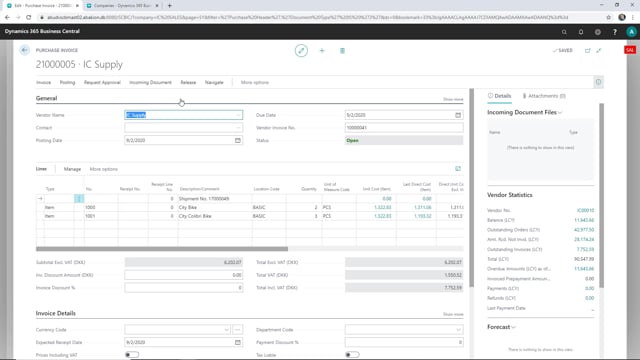


This article explains how intercompany trade works in Business Central when you invoice across two companies. When your supply company invoices its sales order, Business Central automatically creates a matching purchase invoice in your sales company, linked to the original purchase order. You then release and post that purchase invoice to complete the flow, leaving the purchase order fully received and fully invoiced.
You do not have to enter the purchase invoice manually. The invoice is generated from the sales invoice sent by the supply company, which keeps both companies in sync and reduces the risk of mismatched figures.
How the intercompany invoice flow works
When you trade between two companies in Business Central, the document flow runs in a fixed sequence. First the purchase order is received in the buying company. Then the matching sales order in the supply company is invoiced. Once both of those steps are done, you are ready to invoice the purchase order itself.
When you post the sales invoice in the supply company, Business Central creates a purchase invoice in the sales company automatically. That purchase invoice is linked directly to the purchase order, so you do not have to build it from scratch or match lines by hand.
Finding and posting the generated purchase invoice
From the purchase order, you can open the linked invoice through Process and then Show Purchase Invoice. This opens the purchase invoice that was created from the sales invoice sent by the supply company.
Posting it is straightforward:
- First release the purchase invoice.
- Then post it.
Once that is done, the purchase order is fully received and fully invoiced. Both companies now reflect the same transaction, with no manual data entry on the receiving side.
Q&A
How is the purchase invoice created in the sales company?
It is generated automatically from the sales invoice that the supply company posts. You do not create it manually. The invoice is linked to the original purchase order.
What needs to happen before you can invoice the purchase order?
The purchase order must be received, and the matching sales order in the supply company must be invoiced. Once both are done, you can invoice the purchase order.
How do you open the linked purchase invoice from the purchase order?
Use Process and then Show Purchase Invoice on the purchase order. This opens the invoice created from the supply company’s sales invoice.
What are the steps to post the purchase invoice?
Release the invoice first, then post it. After posting, the purchase order is fully received and fully invoiced.